METAR & TAF REPORTS

> Part 5 of 6

TAF Reports
Part 1: Time Elements

Map out your flight timeline
with forecast windows

MISSION: Pawnee Grassland Summer Documentation

Field Notes: Checking Data Freshness

T-minus 24 hours | Is this forecast fresh?

Here’s the revised story with BECMG, TEMPO, and FM woven in:

You sit in your truck, looking at that SPECI report. Overcast at 1,000 feet. Not ideal for golden hour photography.

Then an idea hits you: What if you just stayed?

You always bring your camping gear anyway—it’s part of your adventure. A night under the stars, then wake up for that gorgeous dawn light. Or better yet, stay through tomorrow and catch golden hour the next evening. Morning light on the prairie is stunning.

But before you commit to an overnight camping trip, you need to know what the weather’s actually going to do. That’s when you remember: the TAF report.

Unlike the METAR, which shows current conditions, the TAF is a forecast that covers the next 24-30 hours. It shows you how conditions are expected to change over time—perfect for planning extended missions.

You pull up the TAF for the nearest airport and scan the forecast period.

Tonight’s outlook isn’t great. The TAF shows those overcast clouds getting lower—you notice indicators showing the ceiling will gradually drop to just 300 feet AGL over the next few hours. That’s barely above the treeline. The sun will definitely be blocked.

You also notice sections showing temporary fluctuations—brief periods where conditions might improve slightly, then worsen again. Not reliable enough to plan a shoot around.

But then you look at tomorrow morning’s forecast.

There’s a notation showing conditions will change suddenly just after midnight. The forecast shows a clear shift—clouds lifting, visibility improving. And by tomorrow’s golden hour? The TAF shows clear skies and light winds—ideal flying conditions.

You smile. Decision made.

You’re skipping tonight’s shoot, but thanks to the TAF, you know tomorrow you’re likely golden suggest a different word then golden in this context where you’re already talking about golden hour. Maybe You’ll be good to go. Time to set up camp.

This is the power of the TAF report. It doesn’t just tell you yes or no for right now—it shows you the weather timeline and how conditions will change, so you can plan ahead and make smart decisions about when to fly.

In This Lesson You’ll Learn:

We’re going to show you how to read an actual TAF report so you can map out your flight timeline just like this. You’ll learn when the forecast was issued, what window it covers, when conditions change, and when to expect transitions or temporary weather events. *In the next lesson we’ll show you how to read the weather elements, which use the same shorthand as METAR reports.

When you’re planning your flight missions, you’ll be able to time your launch with precision, so there’s no need for guessing and no more getting caught off guard by weather shifts.

Understanding the TAF Timeline

Let’s decode this TAF timeline step by step. We’ll highlight each time element and show you exactly what it means.

Quick Review

Issue Time & Forecast Valid Period

From Lesson 2, you know:

Now let’s learn: How conditions change within that 30-hour window.

Now we’re diving deeper to find out:

  • How does the timeline work WITHIN that forecast window?
  • When do weather conditions change?
  • When are weather transitions gradual vs. instant?

Let’s decode the timeline.

TAF

Where Your Timeline Starts

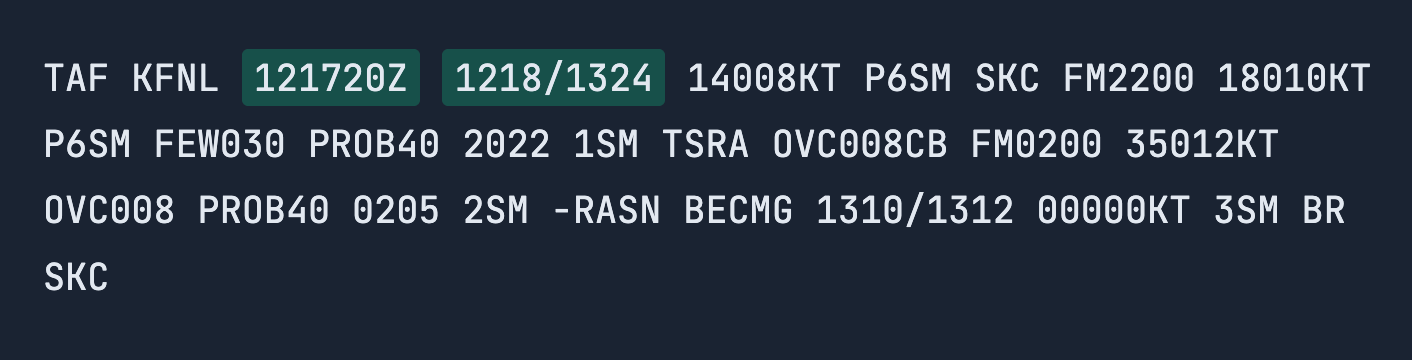
1218/1324

The forecast begins at 1218 (12th day at 18:00 Zulu = 6:00 PM local). This is where your timeline starts.

The initial weather conditions listed after 1218 apply from this moment forward until the next time indicator.

Key Point: Everything listed after the forecast valid period (1218/1324) represents the starting conditions. These conditions will remain in effect until you see a time indicator like FM, BECMG, or TEMPO that signals a change.

TAF

Gradual Weather Transition

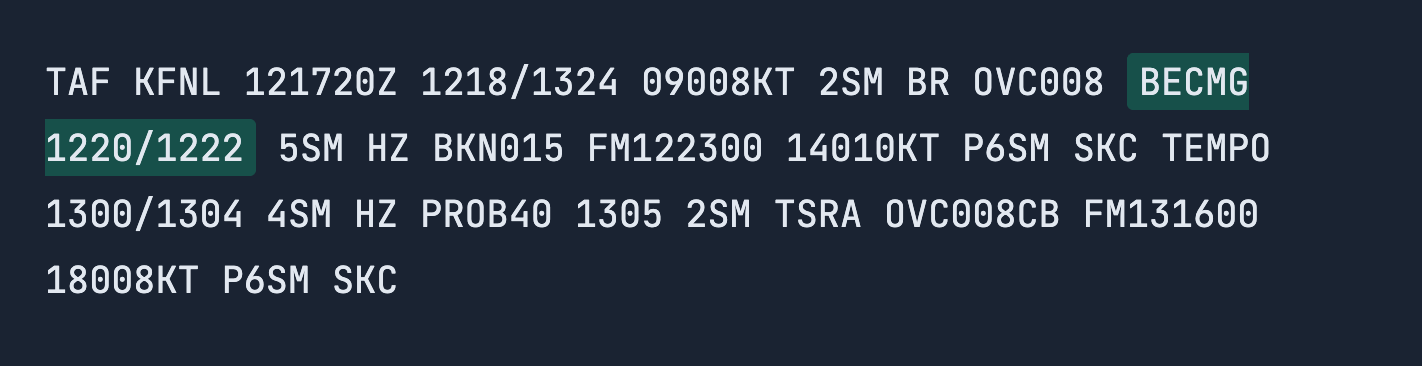
BECMG 1220/1222

BECMG means “becoming”—this indicates a gradual transition in weather, not an instant change.

Between 20:00Z and 22:00Z, the timeline shows BECMG 1220/1222.

In this TAF report, BECMG 1220/1222 tells you conditions will gradually change sometime during this 2-hour window.

The weather listed after BECMG 1220/1222 represents what conditions will be like by the end of the transition period.

The change doesn’t happen at exactly 20:00Z—it happens gradually between 20:00Z and 22:00Z.

For example, the visibility may gradually increase during a 2 hour period.

Breaking Down: BECMG 1220/1222

  • BECMG = Becoming (gradual change)
  • 1220 = 12th day at 20:00Z
  • 1222 = 12th day at 22:00Z

TAF

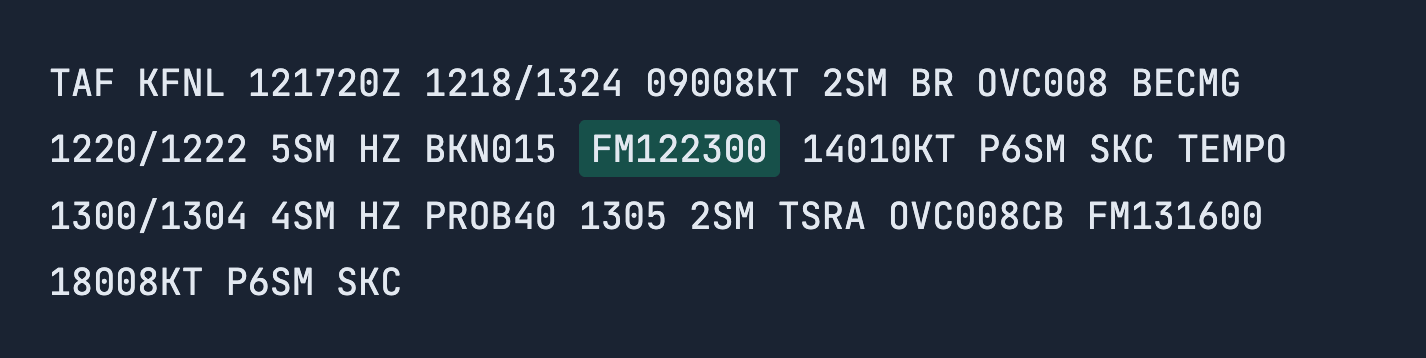
Instant Weather Change

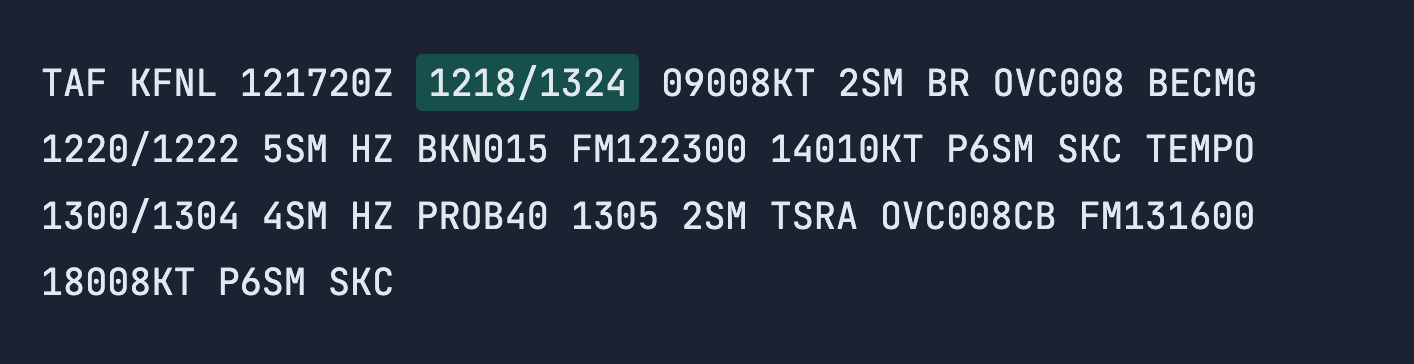
FM122300

FM means “from”—this indicates an instant change at this exact moment.

FM vs. BECMG: Unlike the gradual transition you saw with BECMG, FM means conditions switch instantly at 23:00Z. Meaning, the moment 23:00Z hits, the forecast changes swiftly.

The weather listed after FM122300 applies from that moment forward until the next time indicator.

Breaking Down: FM122300

  • FM = From (instant change)
  • 12 = 12th day
  • 2300 = 23:00 Zulu (11:00 PM)

TAF

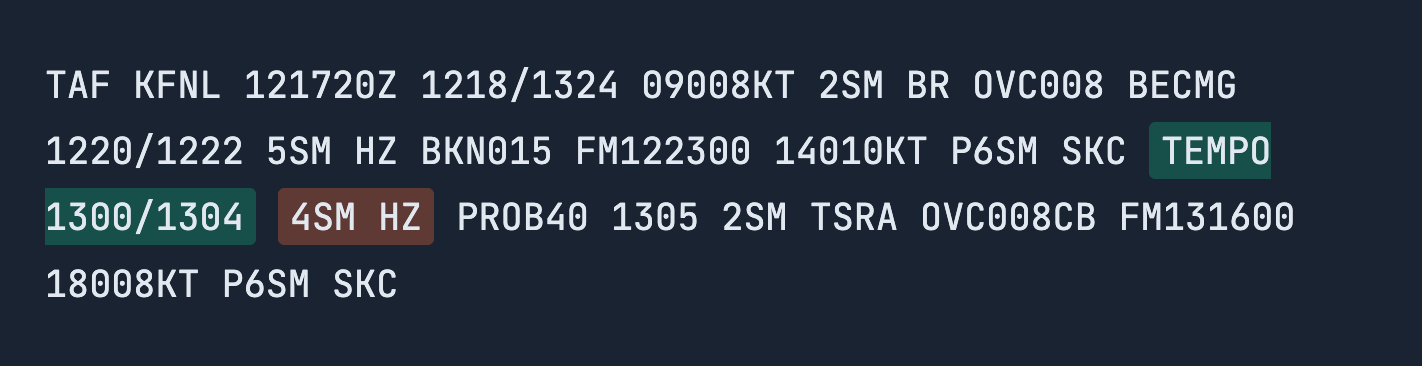
Temporary Weather Fluctuations

TEMPO 1300/1304

“TEMPO means ‘temporary’. Conditions listed after TEMPO will temporarily fluctuate from the prevailing conditions during this period. Think of it as a brief passing of weather.

Each fluctuation lasts less than one hour and occurs less than half the time during the window. The conditions might temporarily improve or worsen, then return to the prevailing forecast.

On this TAF, TEMPO 1300/1304 means between 00:00Z and 04:00Z on the 13th, expect temporary fluctuations.

TAF

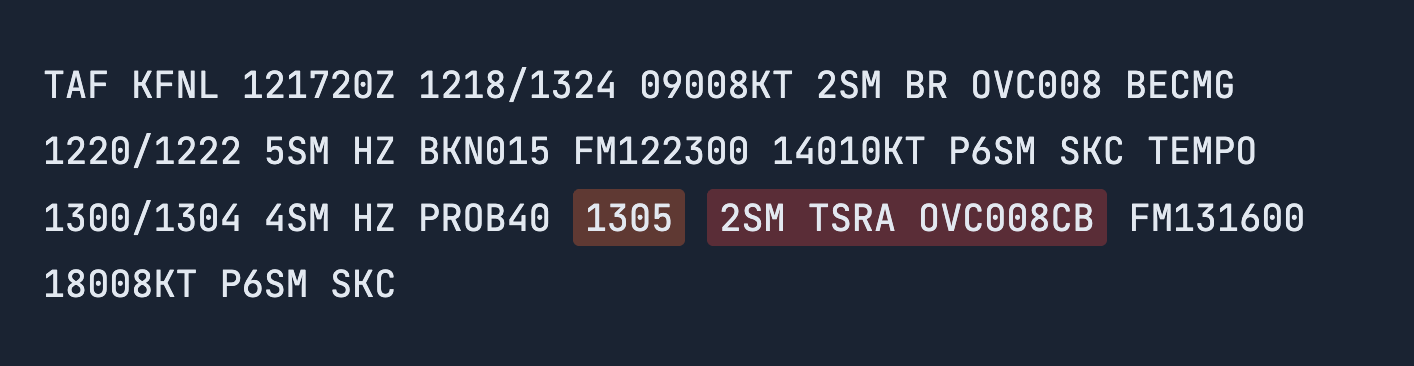
Exact Moment of Specific Weather Event

1305

This is a specific time reference. It marks an exact moment when particular conditions may occur.

Unlike FM (which starts new lasting conditions) or TEMPO (which shows fluctuations over a period), a specific time like 1305 pinpoints a single moment in the forecast.

These are often paired with probability indicators (like PROB40) to show the chance of those conditions occurring at that precise time.

In this TAF, 1305 lets us know that at exactly 05:00Z on the 13th , there’s a specific weather event forecast.

.

Quick Review

Understanding the Different Change Types

FM (From)

Type: Instant change

When: At exact moment

Duration: Permanent (until next change)

Example: FM122300 – At 11PM, conditions instantly switch to clear skies

BECMG

Type: Gradual transition

When: During time window

Duration: Permanent (once complete)

Example: BECMG 1220/1222 – Fog gradually lifts between 8-10PM

TEMPO

Type: Temporary fluctuation

When: During time window

Duration: Brief (<1hr, <50% of time)

Example: TEMPO 1300/1304 – Visibility briefly dips then returns to normal

Putting it all together

Understanding the Different Change Types

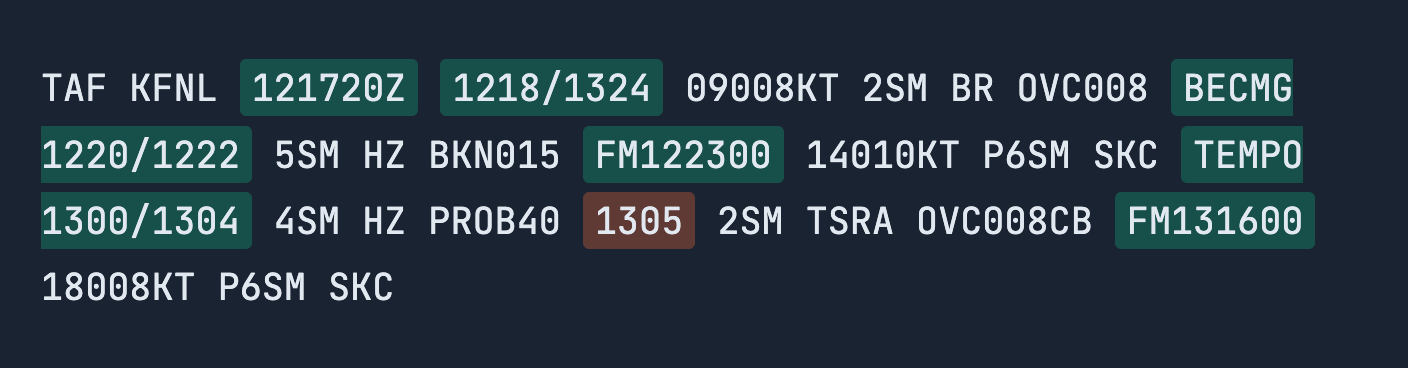
Now you can read the entire TAF timeline! woop woop.

Let’s look at just the visibility to see when it’s legal to fly (remember: Part 107 requires 3SM minimum):

🎯 Flight Planning Based on Timeline:

  • 121720Z = TAF issued on 12th at 17:20 Zulu
  • 1218/1324 = Forecast valid from 12th 18:00Z through 13th 24:00Z (30-hour window)
  • Initial conditions (1218): Visibility 2SM – ILLEGAL (below 3SM)
  • BECMG 1220/1222: Gradual improvement to 5SM between 8-10PM – improving but not yet legal
  • FM122300: Instant change at 11PM, visibility P6SM (greater than 6 miles) – LEGAL window opens!
  • TEMPO 1300/1304: Temporary fluctuations to 4SM during midnight-4AM (still legal)
  • 1305: Specific moment at 5AM, visibility drops to 2SM – ILLEGAL at this time
  • FM131600: Instant change at 4PM, visibility P6SM – LEGAL for golden hour!

Practice Quiz

TAF Reports: Time Elements

1 / 12

Which statement correctly describes the difference between BECMG and FM on a TAF report?

2 / 12

For KOKC, what is the issue time of the TAF report?

3 / 12

What is the forecast valid period for the KOKC TAF report?

4 / 12

On the TAF report for KOKC, what does FM051600 indicate?

5 / 12

What is the purpose of the forecast valid period in a TAF?

6 / 12

What does a standalone four-digit Zulu time (such as 2022) indicate in a TAF?

7 / 12

What does BECMG tell you in a TAF?

8 / 12

What does TEMPO indicate in a TAF?

9 / 12

On the TAF report, what does the highlighted time range 0606/0608 indicate?

10 / 12

Which TAF time group indicates a gradual change in conditions?

11 / 12

In the TAF for KOKC, what does TEMPO 1212/1214 tell you?

12 / 12

In the TAF for KOKC, what does BECMG 0606/0608 indicate?

Your score is

The average score is 25%

0%

You’re forecasted to Ace this exam!

What’s Next?

What you’ve learned: You can now read the TAF timeline to understand when the forecast was issued, what time window it covers, and how conditions change throughout that period. You understand the difference between instant changes (FM), gradual transitions (BECMG), temporary fluctuations (TEMPO), and specific moments (like 1305).

In the next lesson, we’ll decode the actual weather elements—wind, visibility, clouds, and weather phenomena—that follow each of these time indicators. You’ll learn to read the complete forecast, not just the timeline.

Lesson 5/6 | Aviation Weather Reports

Reading TAF Reports (Part 1): Time Elements

Map out your flight timeline with forecast windows

Picture This:

You’re planning to document Pawnee National Grassland for a nonprofit conservation project you contribute to. The preserve is about 60 miles northeast of Denver, and you want to capture the native shortgrass prairie during golden hour today (the 12th) and again at sunrise tomorrow morning.

You pull up the TAF report for the nearby airport, which lets you know the weather forecast for the next 24-30 hours. The issue time shows 121720Z—issued today (the 12th) at 17:20 Zulu. The forecast valid period reads 1218/1324, meaning it covers from today at 18:00 Zulu through tomorrow (the 13th) at 24:00 Zulu.

Perfect—that’s your entire documentation window plus some buffer time.

Now you scan through the forecast and see FM2200 that’s 10 pm, not golden hour. That means “from 22:00 Zulu,” new conditions begin. The winds are shifting and picking up. You do the quick Zulu-to-local conversion in your head and realize that’s right around when you planned your evening golden hour flight.

Further down, you notice BECMG 1310/1312—”becoming between the 13th at 10:00Z and 12:00Z.” The weather is gradually transitioning during that window. That’s tomorrow morning, right when you want to capture the sunrise over the grassland. sunrise would be around 0600Z, not 10 am You’ll need to monitor conditions closely.

You also spot specific times like 2022 and 0205—these aren’t “from” times, they’re exact moments when temporary conditions (like a 40% chance of thunderstorms) might pop up.

Here’s what you’ll learn in this lesson: We’re going to show you how to read an actual TAF report so you can map out your flight timeline just like this. You’ll learn when the forecast was issued, what window it covers, when conditions change, and when to expect transitions or temporary weather events. *In the next lesson we’ll show you how to read the weather elements, which use the same shorthand as METAR reports.

When you’re planning your flight missions, you’ll be able to time your launch with precision, so there’s no need for guessing and no more getting caught off guard by weather shifts.

Understanding TAF Time Elements

The crux of TAF reports is being able to read what the forecasted weather will be in the next 24-30 hours. To do this effectively, you need to understand the time references that structure the entire forecast.

Even if you’re not talking to ATC directly, these broadcasts give you access to FAA communications about runway use, traffic flow, weather expectations, and operational safety around you.

1. TAF Issue Time & Forecast Period

Before you can interpret any forecasted weather in a TAF report, you need to understand when the forecast was issued and the time window it applies to.

These two elements establish the timeline for the entire report. Once you know them, every other time reference in the TAF becomes easier to understand.

> Issue Time

When was this TAF report issued?
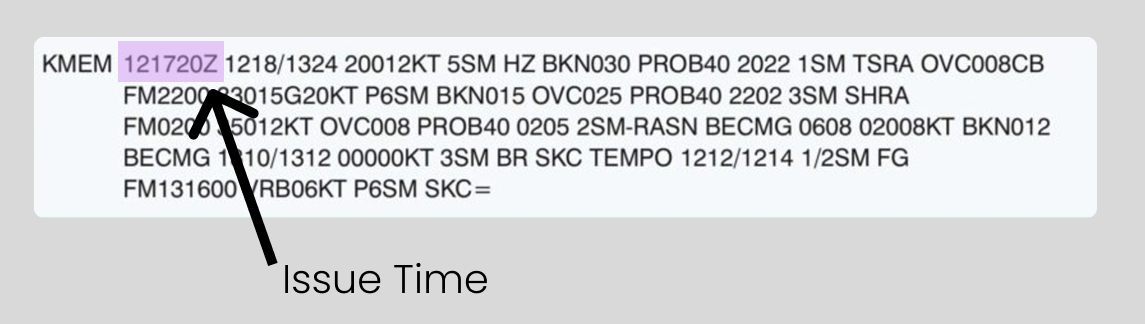
The first element you’ll see in a TAF report is the issue time. It’s displayed in the same format as a METAR issue time, using Zulu Time.

The issue time tells you when the TAF was published and marks the start point from which the 24–30 hour forecast period begins.

> Forecast Valid Period

During what time window is this forecast valid?
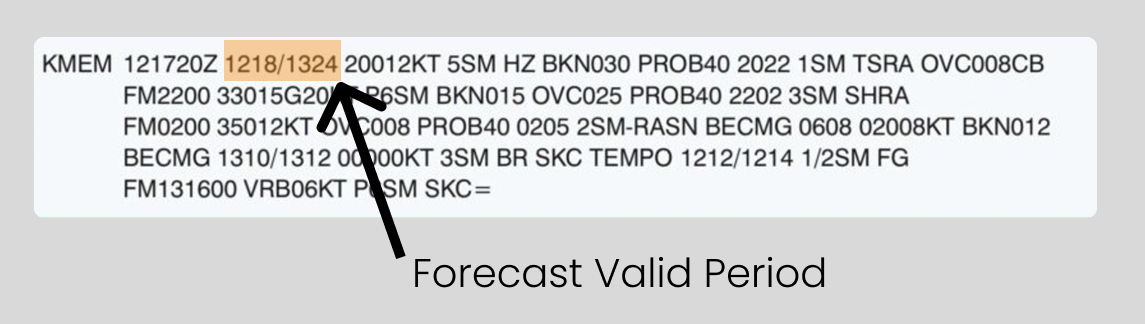
The Forecast Valid Period tells you when the forecasted weather applies. This is the overall time window during which the listed weather conditions are expected to occur.

The forecast valid period is shown as two Zulu times separated by a slash (/) and appears near the beginning of the TAF immediately after the issue time.

Using the example 1218/1324, the group follows the DDHH format:

2. TAF Time Indicators Within Forecast

Once you understand the issue time and forecast valid period, the next time elements to understand are:

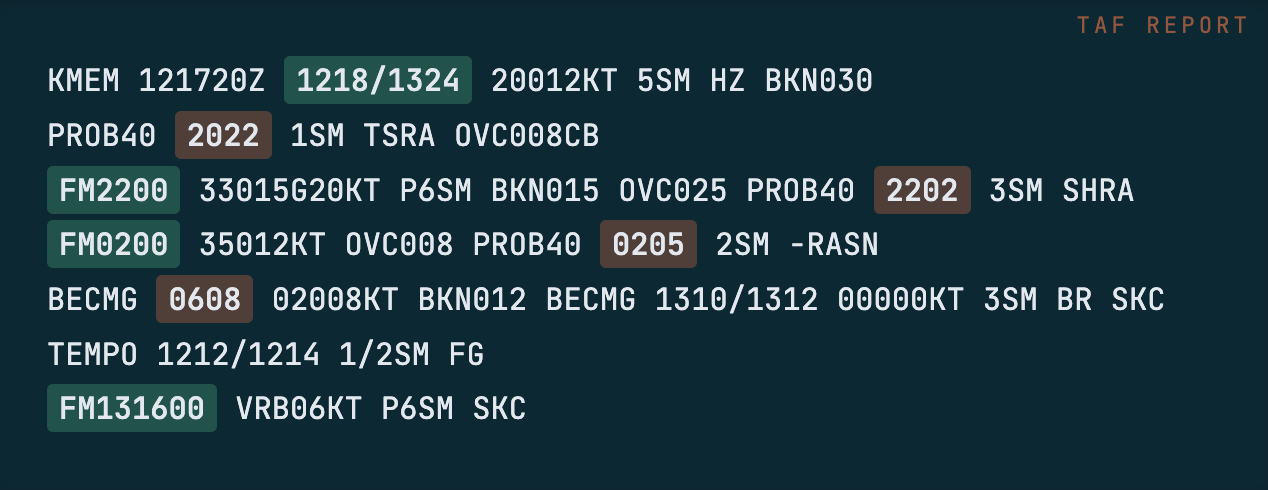
  • Specific times (such as 2022) — exact moments when conditions apply
  • FM (from) times — when new conditions begin (FM2200)
  • BECMG (becoming) — gradual weather transitions

> Specific Time References

At what exact time do the following weather conditions apply?
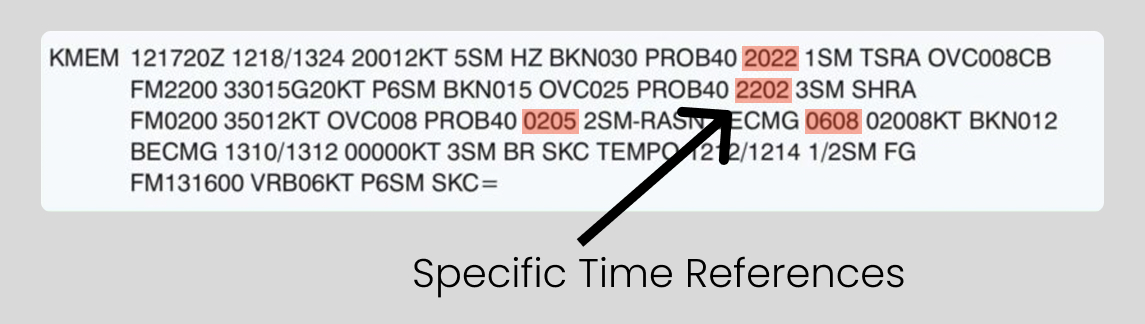
After the forecast valid period and any FM groups, you may see standalone four-digit Zulu times listed in the TAF, such as: 2022, 2202, 0205, 0608.

These are specific time references. They indicate the exact Zulu time when the weather conditions listed immediately after apply.

How to Read Them:

  • Each four-digit time follows the format: HHMM (Zulu Time)

> Becoming Between (Gradual transition period)

During what time does the weather begin shifting?

BECMG means “becoming,” indicating a gradual, permanent change in weather conditions over a specified time period.

> From: New forecast conditions begin move the “from” section to go before the “becoming” section, same as you have them listed in the intro before “specific”

When do new forecast conditions begin?
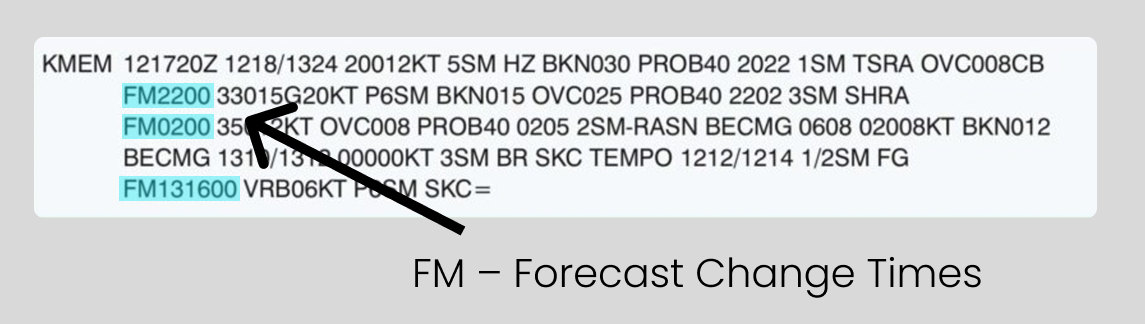
You’ll see FM listed in two common ways:

This difference exists because TAF reports cover the next 24–30 hours and often span more than one day.


Practice Quiz

TAF Reports: Time Elements

1 / 12

Which statement correctly describes the difference between BECMG and FM on a TAF report?

2 / 12

For KOKC, what is the issue time of the TAF report?

3 / 12

What is the forecast valid period for the KOKC TAF report?

4 / 12

On the TAF report for KOKC, what does FM051600 indicate?

5 / 12

What is the purpose of the forecast valid period in a TAF?

6 / 12

What does a standalone four-digit Zulu time (such as 2022) indicate in a TAF?

7 / 12

What does BECMG tell you in a TAF?

8 / 12

What does TEMPO indicate in a TAF?

9 / 12

On the TAF report, what does the highlighted time range 0606/0608 indicate?

10 / 12

Which TAF time group indicates a gradual change in conditions?

11 / 12

In the TAF for KOKC, what does TEMPO 1212/1214 tell you?

12 / 12

In the TAF for KOKC, what does BECMG 0606/0608 indicate?

Your score is

The average score is 25%

0%