Getting Started
What This Looks Like in Action
Moments That Matter
Imagine: You’re out flying a drone for a coastal aerial documentation project—paid gig, perfect weather, smooth air. As you track the shoreline, you spot the exact S-curve you’ve been waiting for. You bank hard to the left—tight 60° sweep to capture the cinematic arc. It’s the kind of move that makes clients or your audience say “wow.”
But here’s the catch: if you didn’t calculate the load factor before making that turn, you might have just overloaded your drone.
Load factor tells you how much extra force is acting on your drone during a maneuver. A G-force (short for “gravitational force”) is what astronauts train for and what you feel when you hit a sharp curve on a roller coaster. It’s the sensation of your body getting heavier under acceleration—and your drone feels the same thing in the air.
The sharper the bank, the more G-force it feels—and the more lift it has to generate just to stay airborne. If that number exceeds what your drone is built to handle, you could stall, lose control, or damage the aircraft.
As a drone pilot, you’re constantly balancing performance with safety. Knowing how to calculate load factor before you commit to a maneuver means you fly smarter, protect your drone, and still capture those jaw-dropping turns that make people stop and stare.
Lesson Focus
Mastering the Math of Flight
In this lesson, you’ll learn how to calculate load factor—the increase in gravitational force (G-force) acting on your drone when you bank or turn.
We’ll walk you through how to use the FAA Load Factor chart to match your drone’s weight with your intended bank angle. You’ll learn how to determine if your maneuver is safe before you fly it.
By the end, you’ll be able to confidently assess if your drone can handle a specific turn without risking structural damage or a stall.
Where This Becomes Relevant
Why You’ll Use This
- Cinematic Turns: Capturing a dramatic curve around a building, coastline, or event crowd without risking overloading your drone mid-shot.
- Tight Navigation in Complex Environments: Flying through tree-lined paths, rocky terrain, or tight alleyways where quick, steep turns are necessary to follow the subject or avoid obstacles.
- Search & Rescue or Mapping Missions: Executing precision turns during grid patterns or orbiting a subject to gather imagery from multiple angles without compromising stability.
- Flying with Payloads: Carrying extra weight (e.g. sensors, cameras, delivery items) means less headroom for G-forces. Sharp turns could push the drone past its load limit if not calculated properly.
- Flying in Gusty or Mountainous Conditions: Turbulent air can increase the load factor unexpectedly, even in seemingly safe flight paths.
- Battery Management: Heavier effective weight means your motors work harder and your battery drains faster. Load factor impacts endurance just as much as weather or payload.
Part 1:
Understanding
Load Factor Dynamics
Defining sUAS Load Factor
Key Terms
Load Factor: The ratio of the total lift being produced by an aircraft to its weight, typically expressed in G-forces. It increases during maneuvers like turns, climbs, and descents, and reflects the extra stress placed on the aircraft’s structure beyond normal level flight.
- In other words: Load factor tells you how much heavier your drone feels when it’s turning or maneuvering. The sharper the turn, the more force it has to fight to stay in the air—like how you feel pressed into your seat on a roller coaster curve.
Maximum Load Factor: Every drone has a maximum load factor it can safely handle. This is the most stress the airframe can take before you risk damage or failure.
How Load Factor Works
Aerodynamics
Load Factor becomes especially important during turns, as well as comes into play in steep climbs, descents, and turbulent air.
Your drone’s actual weight doesn’t change mid-flight—but the effective weight does. That’s because when your drone banks into a turn, it has to generate more lift to maintain altitude.
The steeper the angle, the more lift it needs. That extra lift creates extra force, and that force is what we measure as load factor.
If the drone exceeds its maximum load factor, it’s at risk of stalling—which means the propellers can no longer generate enough lift to keep it in the air. And once a stall begins, recovery becomes much harder. In worst-case scenarios, it can lead to a crash.
To put it simply:
The drone “feels” heavier the harder it turns. Just like when you ride a bike in a tight circle and have to lean hard to stay upright, the drone’s motors and propellers have to work harder to hold altitude during a steep bank.
Your job as a pilot is to know where those limits are. Understanding load factor is what allows you, as the remote pilot, to plan safe flight paths, get the cinematic shots you want, and avoid pushing your drone past the point of no return.
Straight Flight vs. Banked Turns
Airborne Dynamics
In straight, level flight, your drone has a load factor of 1. That means it’s generating just enough lift to balance out its own weight—no more, no less. You can think of it like driving on a flat, straight road with no hills or curves. Everything is stable, efficient, and predictable.
But what happens when your drone starts to bank or turn?
As soon as the drone tilts to one side, it needs to work harder to stay in the air. That’s because it’s now fighting against more than just gravity—it’s also managing the sideways pull from the turn. To maintain altitude, the drone has to generate more lift, and that’s where load factor comes in.
The steeper the bank angle, the more lift is required—and the higher the load factor becomes. That means your drone is effectively carrying more weight, even though nothing physically changed.
In short: the sharper the turn, the harder your drone has to work to stay stable and airborne. And if the load factor climbs too high, you risk stalling or damaging your drone.
Why Load Factor Matters to You as a Pilot
Pilot Logic
Structural Stress:
Higher load factors put additional strain on your drone’s frame, motors, and propellers. This can lead to wear and tear over time—or even sudden failure during flight if you push the limits too far.
Battery Drain:
When your drone feels “heavier” in the air due to increased G-force, the motors have to work harder to generate lift. That extra effort drains your battery faster, cutting down your flight time and reducing your margin for error.
Flight Control Risk:
In steep turns or rapid maneuvers, an overloaded drone becomes harder to control. If the load factor exceeds what the drone is built to handle, you risk losing stability—or even stalling mid-air.
Part 2:
External Forces That
Increase Load Factor
What Makes the Load Increase
Big Picture Understanding
As a remote pilot, it’s not just your own maneuvers that affect how much stress your drone is under. Environmental conditions and aircraft configuration can also cause the load factor to spike—sometimes unexpectedly. Let’s look at the three most common contributors:
1. Wind Gusts & Turbulent Air
When your drone runs into gusty winds or turbulence, the smooth flow of air around the propellers is disrupted. This causes rapid, uneven changes in lift—which the drone’s motors and flight controller have to constantly correct for.
Each correction demands more energy and increases the effective load on the drone’s structure. In other words, the drone feels like it weighs more, even if you’re not turning or climbing.
This sudden increase in load factor can cause the drone to wobble, lose altitude, or become more difficult to control—especially if you’re already flying near its limits.
2. Steep Climbs & Sharp Turns
Both of these maneuvers directly increase load factor:
- In a steep climb, your drone is working harder to generate enough lift to fight gravity. This adds strain to the motors and quickly drains your battery.
- In a sharp turn, the drone banks—tilting its lift angle to one side. To stay at the same altitude, the drone must generate even more lift than in a climb. This further increases the load factor, often more than pilots realize.
The tighter the turn or steeper the climb, the heavier the drone feels.
3. Payload Weight & Maximum Load Factor
Every drone has a maximum load factor it can safely handle. This is the most stress the airframe can take before you risk damage or failure.
Flying with added payload—like a heavy camera, sensor, or delivery item—brings your drone closer to that limit before you even begin maneuvering.
Here’s why this matters:
If you’re already flying near your drone’s weight capacity, even a moderate turn or gust could push the load factor too high.
You’ll also notice shorter battery life, sluggish maneuverability, and reduced climb performance.
And if you exceed the max load factor, you increase the risk of a stall or structural damage, even if the drone doesn’t show signs right away.
As the pilot, it’s your job to factor in the weight you’re carrying and the conditions you’re flying in—because load factor isn’t just about the maneuver. It’s about the whole picture.
Part 2:
Calculating Load Factor
Putting Numbers to Motion
Pre-Flight Planning
Now that you understand what load factor is and why it matters, let’s learn how to calculate it.
This is a pre-flight planning tool you can use any time you’re designing a more advanced maneuver. Whether you’re flying a tight arc around a structure or following a winding road, you’ll want to be sure your drone can handle the extra forces without overloading or stalling.
Now it’s time to do the math. This is a number you can actually calculate before your flight. By understanding this number, you can determine how sharp your turns can be without risking a stall or overloading your drone.
The Load Factor Equation
To calculate load factor, you’ll need two things:
- Your drone’s weight, and
- The bank angle of the turn you plan to make.
These plug into a simple equation:
- Drone Weight × Load Factor = Effective Load During the Turn
So where do you get the load factor for a given angle? That’s where the FAA’s Bank Angle-to-Load Factor Chart comes in. You’ll see it in your training materials and on the Part 107 exam.
Let’s take a look:
Using the FAA Load Factor Chart
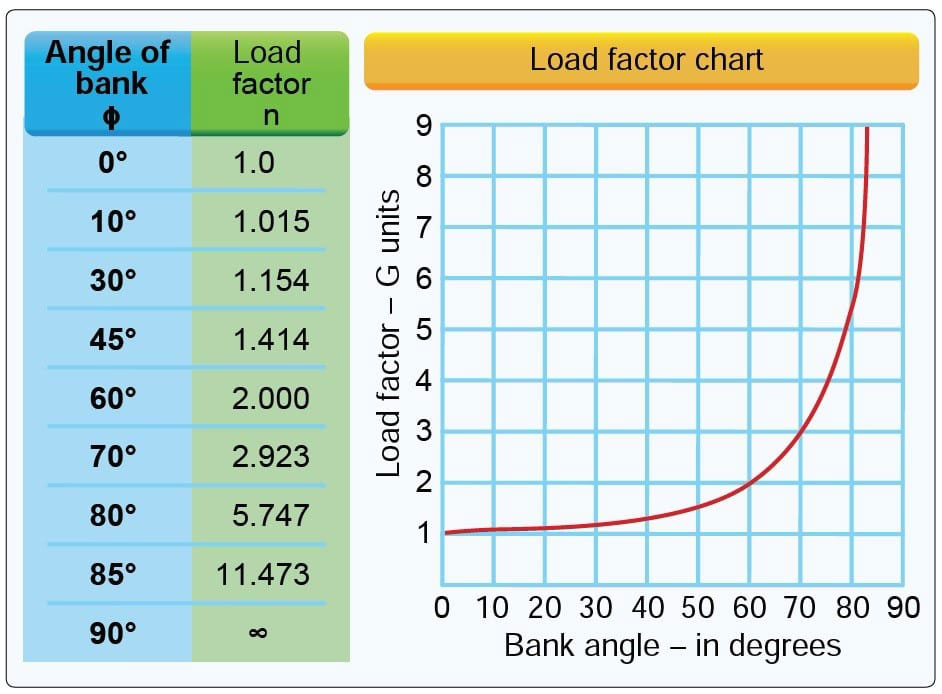
The chart shows how steep turns increase the G-forces acting on your aircraft. It has two parts:
- Table Format (Blue/Green Columns):
- On the left, you’ll find bank angles (in degrees) in blue and their matching load factors in green.
- Line Graph (Red Curve):
- On the right, you’ll see a visual showing how load factor rises rapidly as the bank angle increases. The bottom (X-axis) shows angle; the side (Y-axis) shows load factor.
Examples from the Chart
- 0° (level flight): Load factor is 1.0 (no added force).
- 30° turn: Load factor = 1.154 → drone feels ~15% heavier.
- 60° turn: Load factor = 2.0 → drone feels twice as heavy.
- 80° turn: Load factor = 5.747 → drone feels almost 6x heavier.
As you can see, the relationship isn’t linear — it ramps up fast.
Step-by-Step: Load Factor Calculation
Do the Math
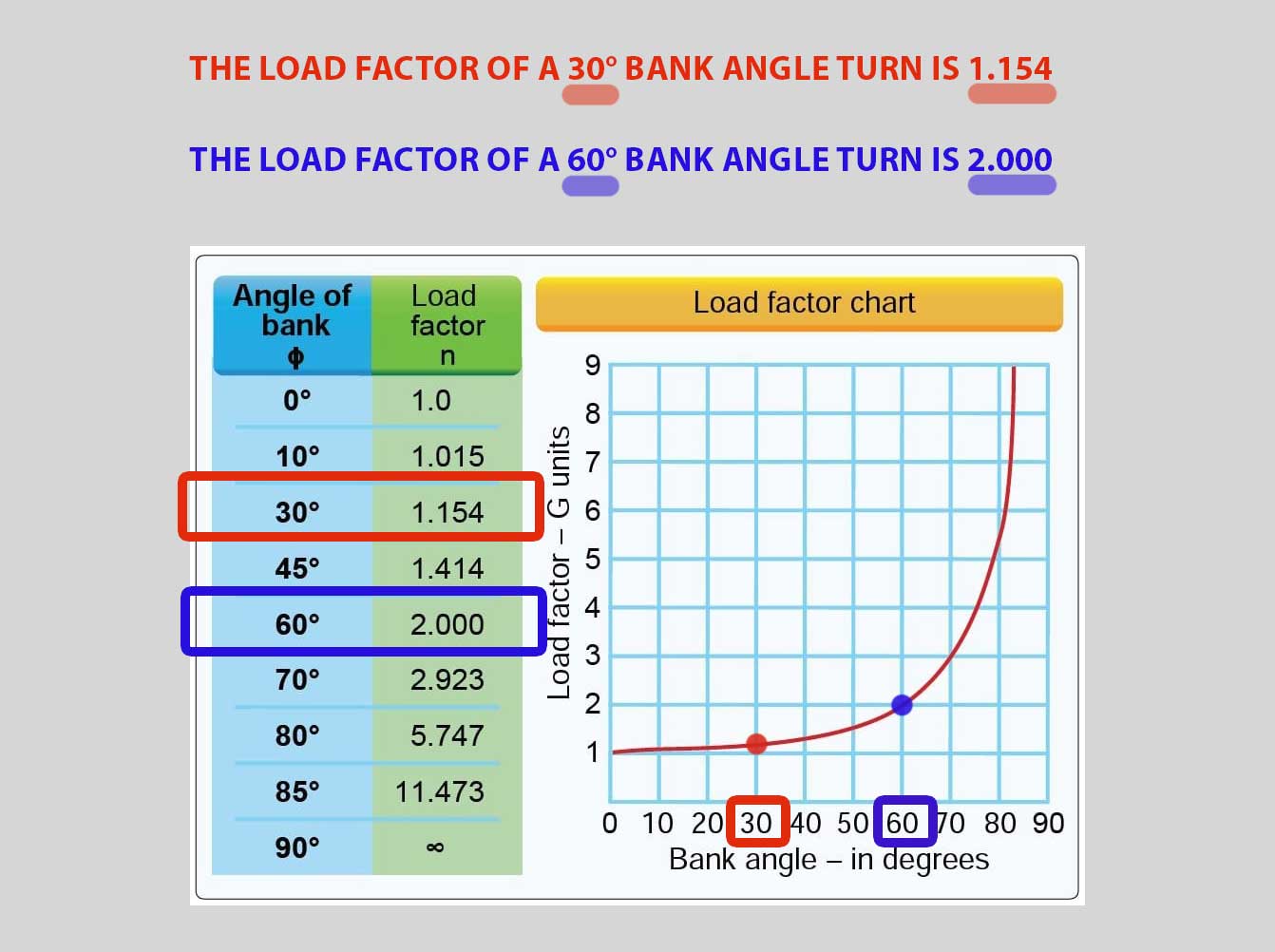
Step 1: Find the Bank Angle on the Chart:
Let’s say you’re planning a 30° banked turn to capture a smooth panoramic sweep.
- Look at the green column on the FAA-provided chart.
- Find 30° in the left column (that’s your turn angle).
- Directly next to it in the right column, you’ll see the Load Factor is 1.154.
This number means your drone will feel 1.154 times heavier during that turn.
Step 2: Plug into the Load Factor Equation:
Now we calculate the actual load your drone will experience:
- Drone weight × Load factor = Effective load
Example:
- Your drone weighs 3 pounds, and you’re banking at 30°.
- The load factor from the chart is 1.154.
3 lb × 1.154 = 3.462 lb
This means that during the turn, your drone will feel like it weighs 3.462 pounds.
- Now compare that number to your drone’s maximum payload capacity, which you’ll find in your manufacturer’s guidelines. If it’s below that limit, you’re good to go to achieve the turn. If not, it’s time to adjust your maneuver.
Load Factor Practice
3 Pound sUAS Load Factor at 30° 60° 80° Angles
Flight Foundations
Scenario:
Let’s say you want to fly your 3 pound sUAS in a wooded area through trees, requiring turns at various degrees. Let’s find out how much of an angle we can achieve without stalling.
Your sUAS weighs 3 pounds, and its manufacturer’s guidelines state it has a max payload capacity of 10 pounds.
What bank angles can your UA handle without stalling?
Remember, if your UA eventually gets so tilted when banking to achieve these angles, the propellors can no longer generate enough lift, and you stall. It’s at this point you’d need to regain control of your drone by reducing the angle of the turn.
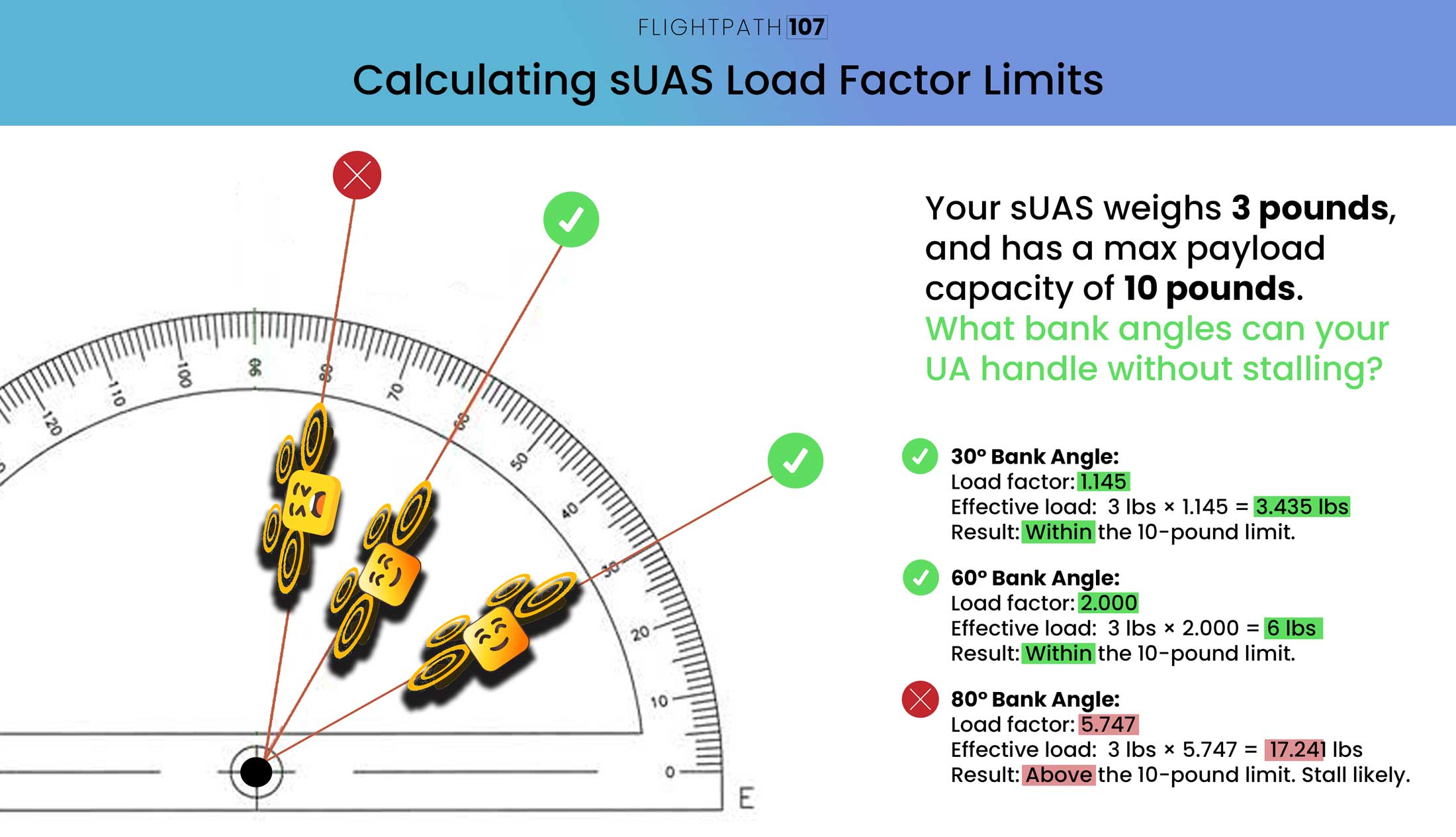
For a 30° bank angle:
- Load factor = 1.145.
- Equation: 3 pounds x 1.145 = 3.435 pounds.
- Within the 10-pound limit. Clear to Turn
For a 60° bank angle:
- Load factor = 2.
- Equation: 3 pounds x 2.0 = 6 pounds.
- Still under the limit. The turn is intense but maneagable.
For a 80° bank angle:
- Load factor = 5.747
- Equation: 3 pounds x 5.747 = 17.241 pounds
- This far exceeds the drone’s capacity of 10 pounds. A stall is very likely—don’t attempt this maneuver.
Practice Quiz
Practice Quiz
quiz title is Payload Shifts, but that’s not part of this section.
question 4, it’s 57.57 pounds, so wouldn’t it need to support 58? 57 wouldn’t be enough?
question 6 the correct answer isn’t one of the options. It’s 46.41 pounds