Intro to Sectional Charts
What Are FAA Sectional Charts?
Think of the sectional chart as a pilot’s map, graphically representing a region’s airspace.
They are flat depictions of 3 dimensional geography and airspace, like any other map such as an atlas.
These charts provide pilots with information about airspace classes, terrain elevation, and obstacles like towers and power lines to help pilots navigate and plan their missions safely.
Suggest deleting this section with the 6 boxes and just start right in with the big sectional chart elements section where you explain each one more thoroughly. These boxes overwhelmed me right at the beginning of the lesson. Key key elements you’ll find include:
(I’d suggest moving this to the end of the lesson) Updating Sectional Charts:
Sectional charts are *updated every *56* days*.
- These updates include latest information on airspace classifications, navigation aids, airports, and other critical details.
- An example of something that might change on a sectional chart between publications is the airspace classification around a newly constructed airport or expanding city. For instance, if an airport gains more traffic, it could shift from uncontrolled Class G airspace to controlled Class D airspace, requiring different operational procedures for pilots.
SECTIONAL CHART ELEMENTs
1) Notification Boxes
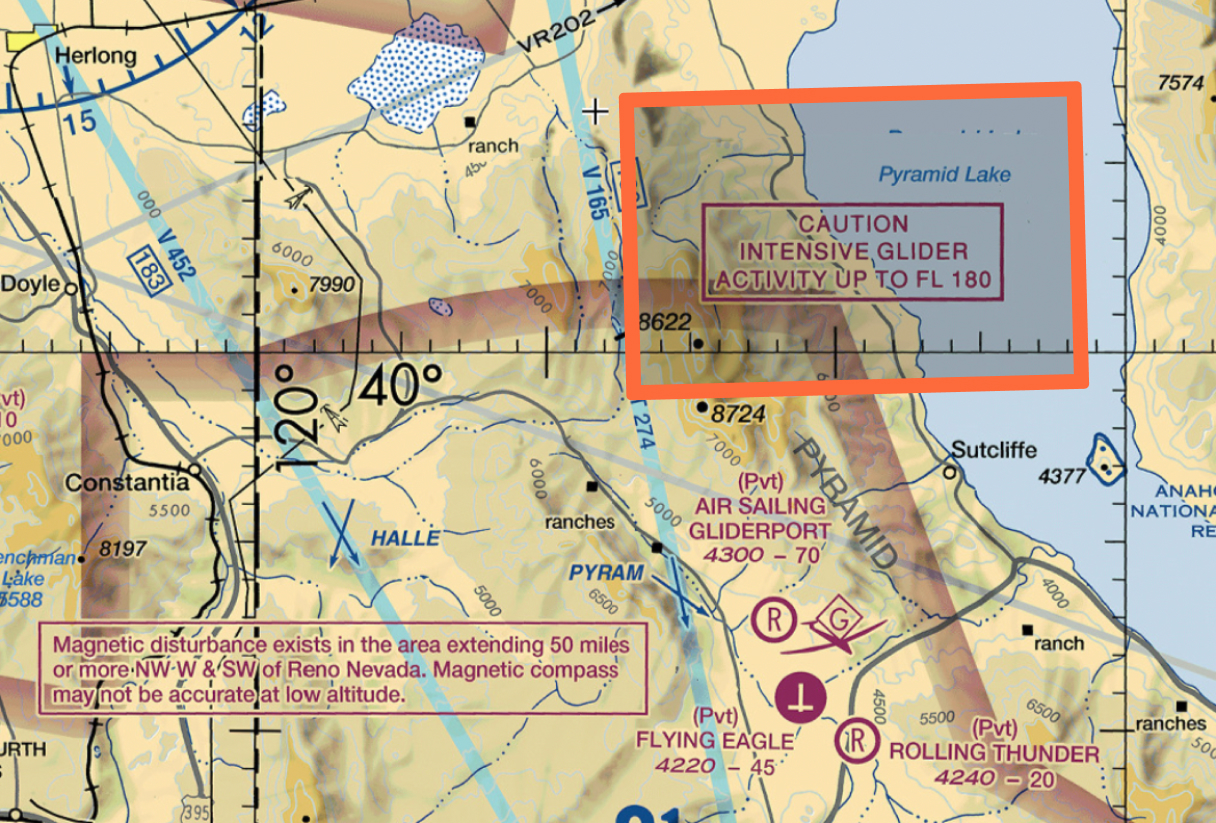
These provide highly important details that could impact your flight, like temporary flight restrictions (TFRs) or special activities (parachuting, aerial events). Remember fellow pilots, accidents can happen, including a fly away rogue drone you wouldn’t want going anywhere near a glider.
Notification Boxes are meant to catch your attention before or during flight planning.
VISUAL AID EXAMPLE:
In the example below there are 2 notification boxes.
- Glider Activity: Explains intensive glider activity up to 180 feet AGL, something you absolutely would want to avoid as a drone pilot.
- Navigation/Rader: States within a 50 mile radius of Reno Nevada there is an anomaly of a magnetic disturbance, and your compass may not be accurate at low altitude. This is something you’d likely only know if you checked the sectional chart for the area.
SECTIONAL CHART ELEMENT
2.) VFR Checkpoints: High Levels of Manned Aircraft Traffic
A VFR (Visual Flight Rules) checkpoint is a designated location on the ground that helps pilots navigate from the sky, often near busy airspace like airports or congested flight paths.
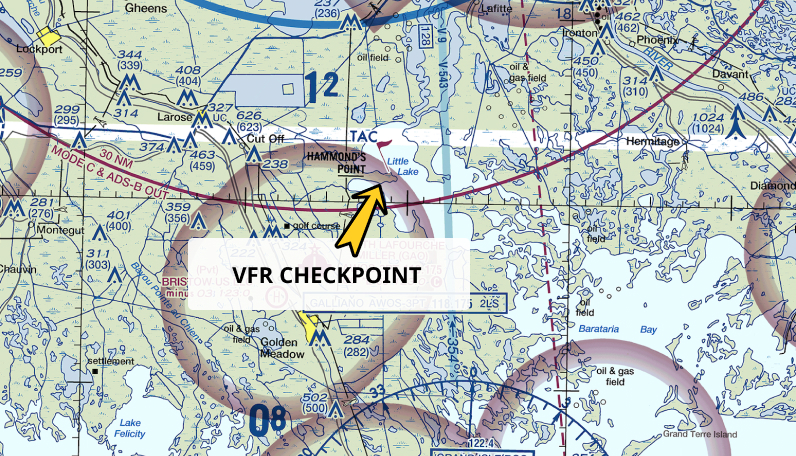
These checkpoints are marked by a magenta flag on a sectional chart.
As a drone pilot, you might wonder why you’d care about a VFR checkpoint, especially since they’re meant for manned aircraft. The key is that these checkpoints are often located in high-traffic areas, where planes are flying visually, (visually?)meaning you’ll likely encounter more aircraft. Knowing where these checkpoints are can help you steer clear of busy flight paths and avoid any potential run-ins with manned aircraft.
VISUAL AID EXAMPLE:
In the example below you’ll see a yellow arrow pointed to the VFR checkpoint magenta flag, located just in the outer rim of the airspace.
SECTIONAL CHART ELEMENT
3.) Isogonic Lines: Make Sure Your Compass is Calibrated
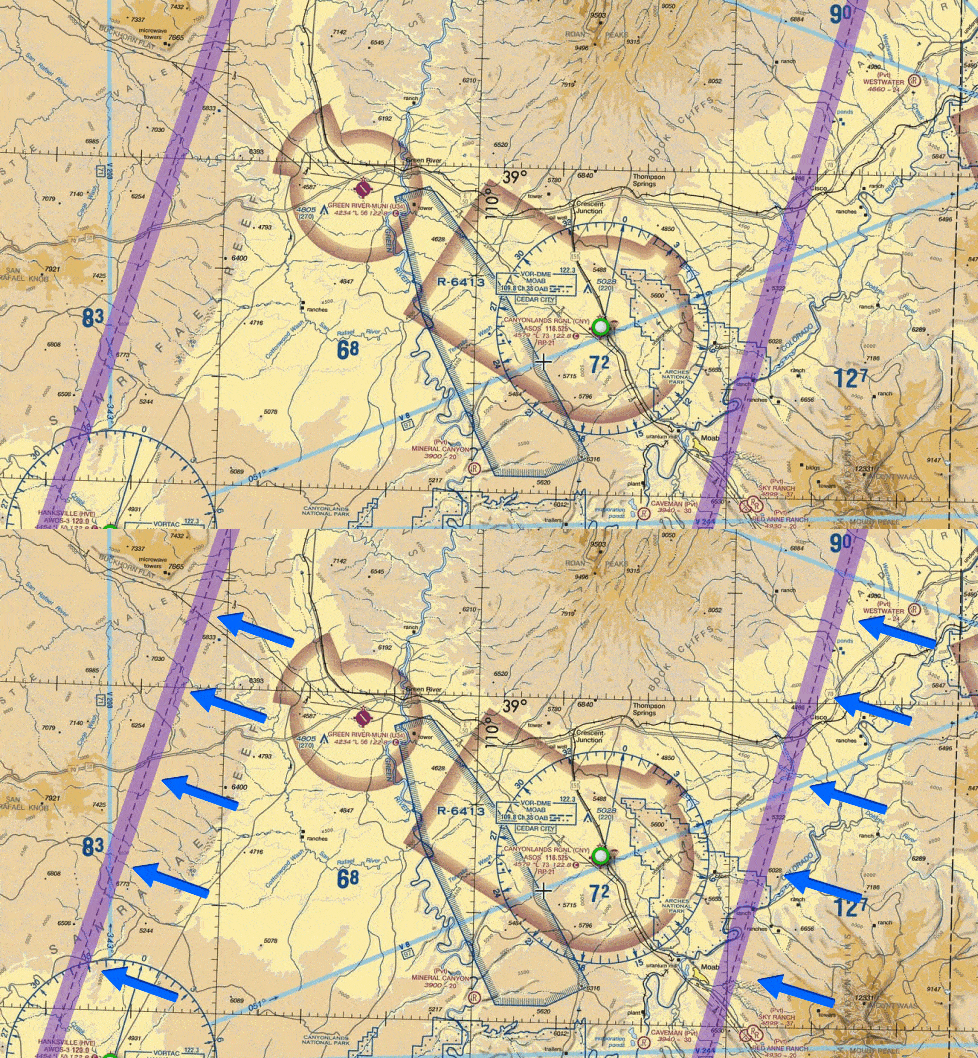
Isogonic lines are lines drawn on maps that show areas of equal magnetic declination, meaning the difference between the direction of u u? (which your compass points to) and true north (the geographic North Pole).
Since the earth’s magnetic field isn’t uniform everywhere, the declination changes depending on where you are.
These lines show you areas where the magnetic declination is the same, helping pilots and navigators understand how much their compass will differ from true north.
Fun Fact: The scientist who discovered these lines was Halley, as in Edmond Halley—yes, the same guy who gave his name to Halley’s Comet. Back in the late 1600s, Halley was one of the first to notice that magnetic declination was different depending on where you were on Earth. He studied this and plotted the lines of equal declination, eventually making them part of navigational maps to help people with compass readings.
Why are these lines on maps today? Back in the days of sailors and early aviators, knowing the magnetic declination was critical for navigating accurately, especially when using compasses. By marking isogonic lines on maps, navigators could easily adjust their course to account for the magnetic deviation in different regions. Today, it’s still useful for pilots, drone operators, and anyone using magnetic navigation tools.
VISUAL AID EXAMPLE:
Below you’ll see the arros pointing to the Isogonic Lines on the sectional chart. They are dashed lines.
SECTIONAL CHART ELEMENT
4.) Maximum Elevation Figures: Highest elevations of terrain and obstacles
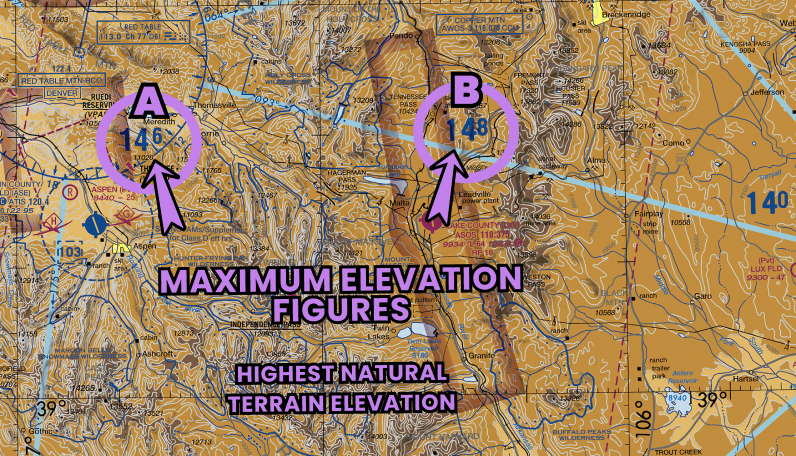
Maximum Elevation Figures (MEFs) on a sectional chart are the highest elevations of terrain and obstacles (like towers or buildings) within a specific area, rounded up to the next hundred feet.
They are shown in feet above sea level and are marked in areas between contour lines. These figures give drone operators a heads-up about the highest point they could potentially fly over in that area.
For drone pilots, MEFs matter because they help you avoid crashing into tall objects or terrain. If you’re flying in an area with a mountain range, for instance, knowing the MEF will tell you the highest point to be aware of.
This is especially important for drone operators since, unlike manned aircraft, drones don’t usually have the same altitude clearance, and even a slight error in altitude could result in a collision with an obstacle. And remember, if you crash your drone, you must report it to the FAA within 10 days! 😉
VISUAL AID EXAMPLE:
Notice the Maximum Elevation Figures in the graphic. A represents 14,600 feet, and B represents 14,800 feet. Those are both very very very high mountains!

Gliders & Parachutes
SECTIONAL CHART ELEMENT
5.) Parachute and Glider Activity Zones
Parachute jumping and glider operations are marked on sectional charts with symbols representing each type of activity:
- Parachute Jumping Areas: Shown with a parachute symbol, these areas may include notes like drop zone names or general altitude ranges.
- Glider Operations: Represented by a glider symbol, indicating areas with regular soaring activity or glider ports.
However, the sectional chart provides only basic info. For more details, including times and schedules, pilots should check the Chart Supplement, which includes:
- Exact locations, altitudes, and times for parachute zones.
- Communication frequencies for coordinating with airfield staff.
VISUAL AID EXAMPLE:
- In the first graphic, depicting a Sectional Chart, notice the Glider symbol representing a glider, and the parachute symbol representing parachute activity. You can also see the CAUTION box announcing the Intensive Aerobatic Activity.
- In the second graphic, depicting a Chart Supplement excerpt, you see the actual timing, and other important details.
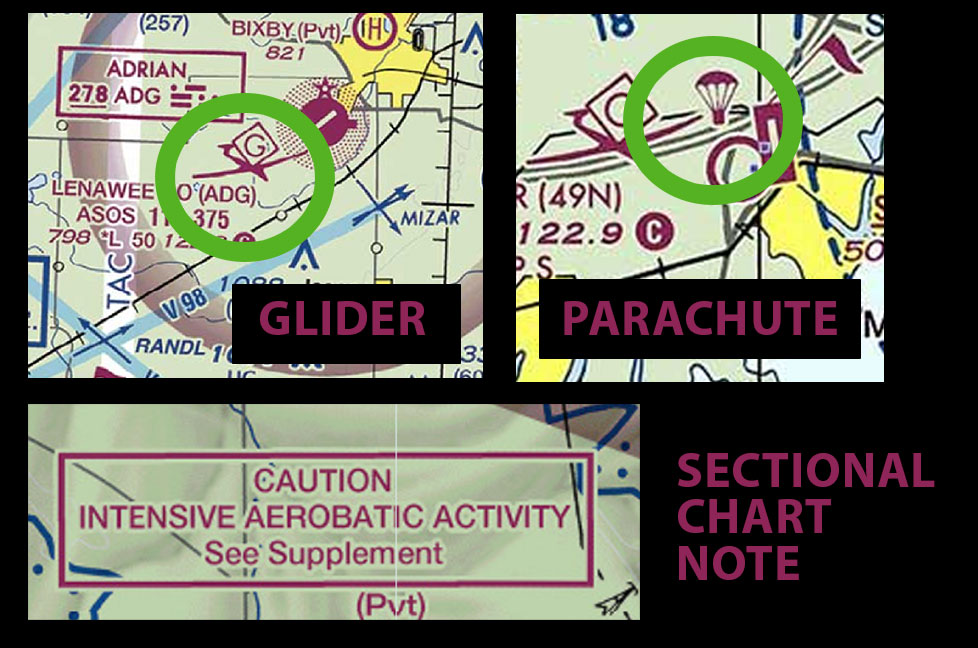
Above: Use Sectional Chart to spot locations
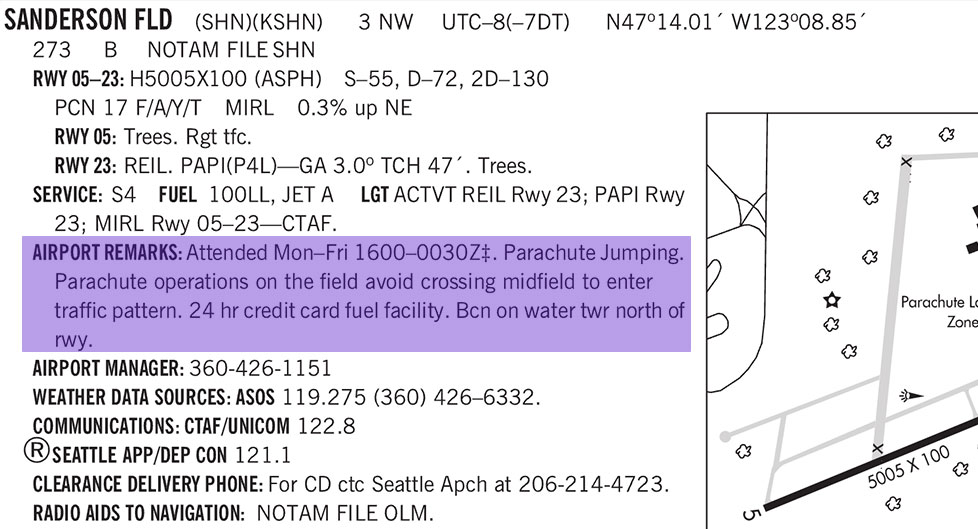
Above: Use Chart Supplement for Detailed Parachute / Glider Info
SECTIONAL CHART ELEMENT
6.) Structures & Obstructions: Weather Balloons & Towers
The Caution Box below lets you know about tethered weather balloons. .
These caution notes warn pilots about tethered balloons that can extend into flight paths. Even though anchored, they can be difficult to see and pose a collision risk.
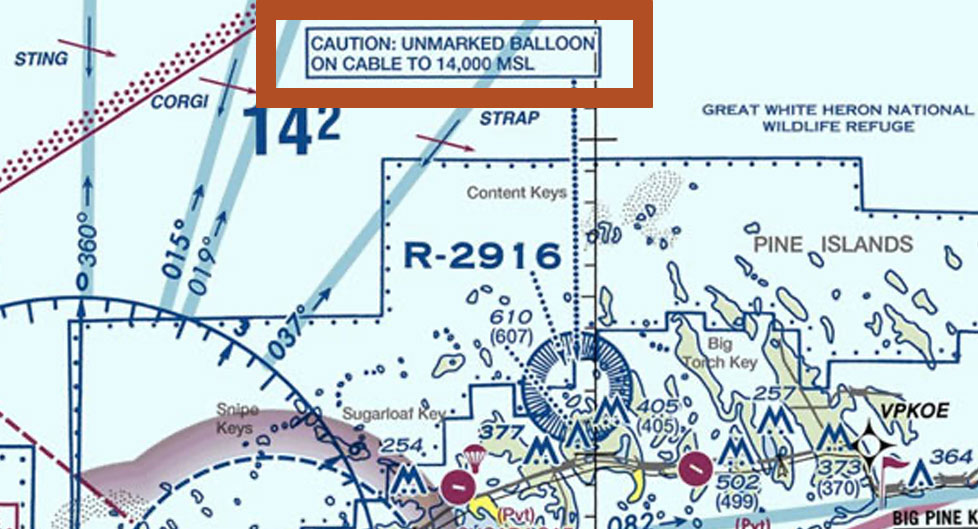
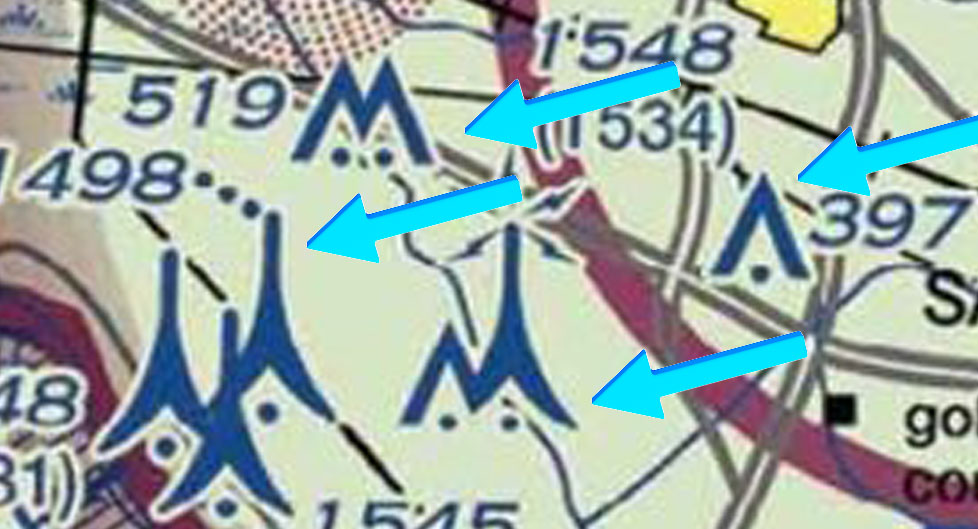
Towers are marked by tower symbols, marked with numbers indicating heights (MSG/(AGL)) and if the tower has a lighting status for visibility. Grouped structures list the tallest point. (How to read tower height will be reviewed in a future lesson. For now just understand the symbols.)