METAR & TAF REPORTS
> Part 3 of 6
Decoding a METAR Report with Clear Conditions
Wind, visibility, and sky clear weather
Should That Be Clear Sky Weather?
MISSION: Pawnee Grassland Summer Documentation
Field Notes: Checking Data Freshness
T-minus 24 hours | Is this forecast fresh?those are same 2 subheads as previous lesson
It’s the day of your conservation documentation flight at Pawnee National Grassland. You’re planning to launch at golden hour—a few hours from now—to capture the prairie in perfect lighting. There’s nothing like capturing video of the planet when the lighting is just right!
You wonder what the weather is like out there right now. You pull up the METAR report for the nearest airport to get a snapshot of current conditions.
The METAR report gives you real-time observed conditions broken down into specific weather elements: wind speed (both sustained and gusting), visibility, present weather conditions, cloud coverage, temperature, dewpoint, and altimeter setting.
You scan through the current weather elements: 10 statute miles visibility, sustained winds at 5 knots with no gusts reported, sky clear, no present weather like rain or fog.
Perfect! Everything looks great right now.
The current conditions are exactly what you’d hoped for—clear skies, calm winds, excellent visibility. If things stay like this through golden hour, you’re in for an ideal flight.
This is the benefit of the METAR report. It gives you a real-time snapshot of actual weather conditions at the airport, broken down into specific, measurable elements.
In This Lesson You’ll Learn:
- How METAR reports show real-time weather conditions for on-site monitoring
- What weather elements both reports provide (visibility, wind, precipitation, clouds, and more)
3 Parts to a METAR Report
Below we show you visually how a METAR report is broken down in 3 steps.
Part 1
METAR or SPECI + Airport Location
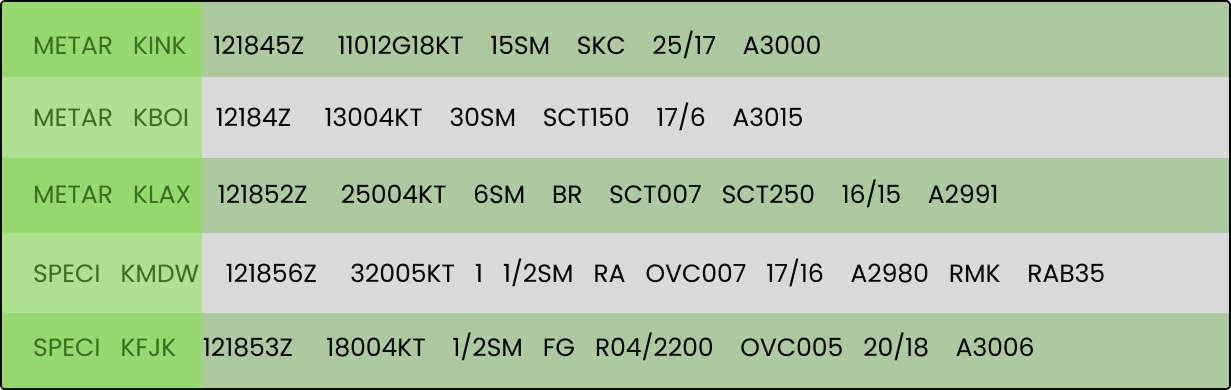
Let’s look at the first two columns where it says METAR or SPECI, followed by the airport identifier.
At the beginning of the report, you may see either METAR or SPECI, followed immediately by the airport identifier where the report is being issued (i.e. KINK, KBOI, KLAX, KMDW, KFJK).
- METAR indicates a routine, scheduled observation.
- SPECI signals an unscheduled report released when weather conditions change significantly between routine updates. A SPECI reflects time-critical changes, such as visibility, ceiling, wind, or active weather, and represents the most current conditions at that airport. SPECI reports takes precedence over the last routine METAR for flight planning and decision-making.
Part 2
Time Issued
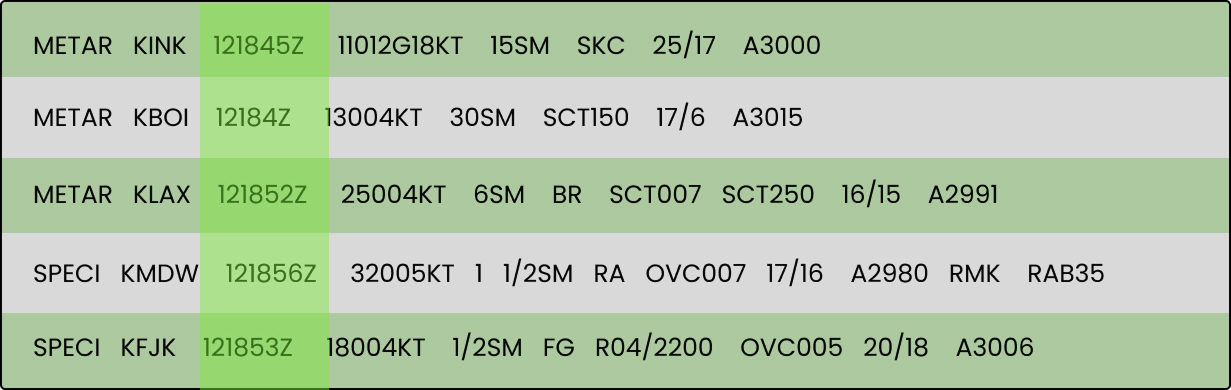
Immediately following the METAR/SPECI and the Airport identifier, we see the report’s issue time.
In the example above, we can see that the the METAR report for KINK was issued at 121845Z, meaning the 12th day of the month at 18:45 Zulu.
Part 3
List of Weather Elements
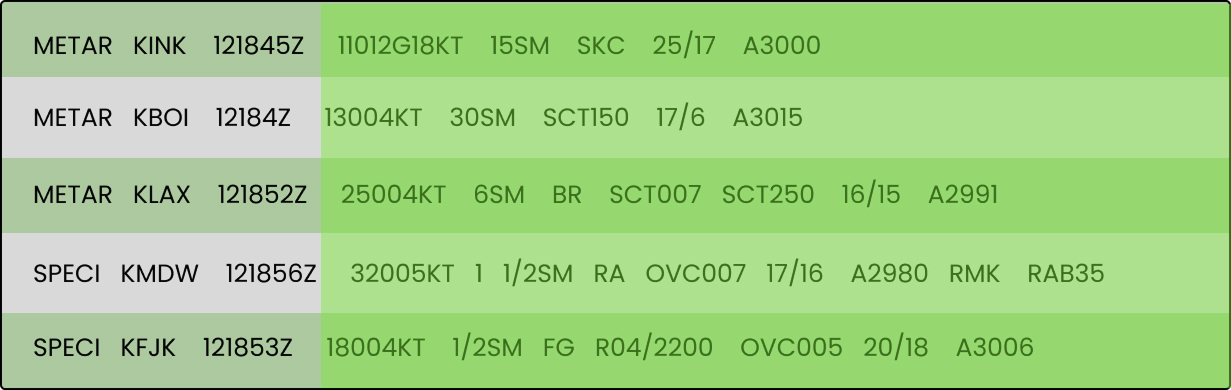
Following the issue time, the weather conditions are listed.
We’ll cover how to interpret each element below, but for now, simply note where this information appears in the report immediately after the issue time.
SUMMING IT UP
Now you can know the METAR report is broken up by the 1.) Report Type and Airport identifier, 2.) Report Issue Time, and 3.) Current Weather Elements.
Next let’s break down the weather elements:
METAR Weather Elements
Lets take a look at the actual weather elements that are displayed on METARs.
METAR
Decoding Aviation Weather Codes
The visual aid below will give you an overview of what a METAR report will let you.
Before you’re about to take flight, you’ll want crucial weather information for your flight, such as the wind speed, visibility, sky condition, cloud coverage, temperature, dew point, and even atmospheric pressure. This information gives you the perfect immediate snapshot of the weather in the area you intend to fly, so you can make a solid and safe decision about taking flight.
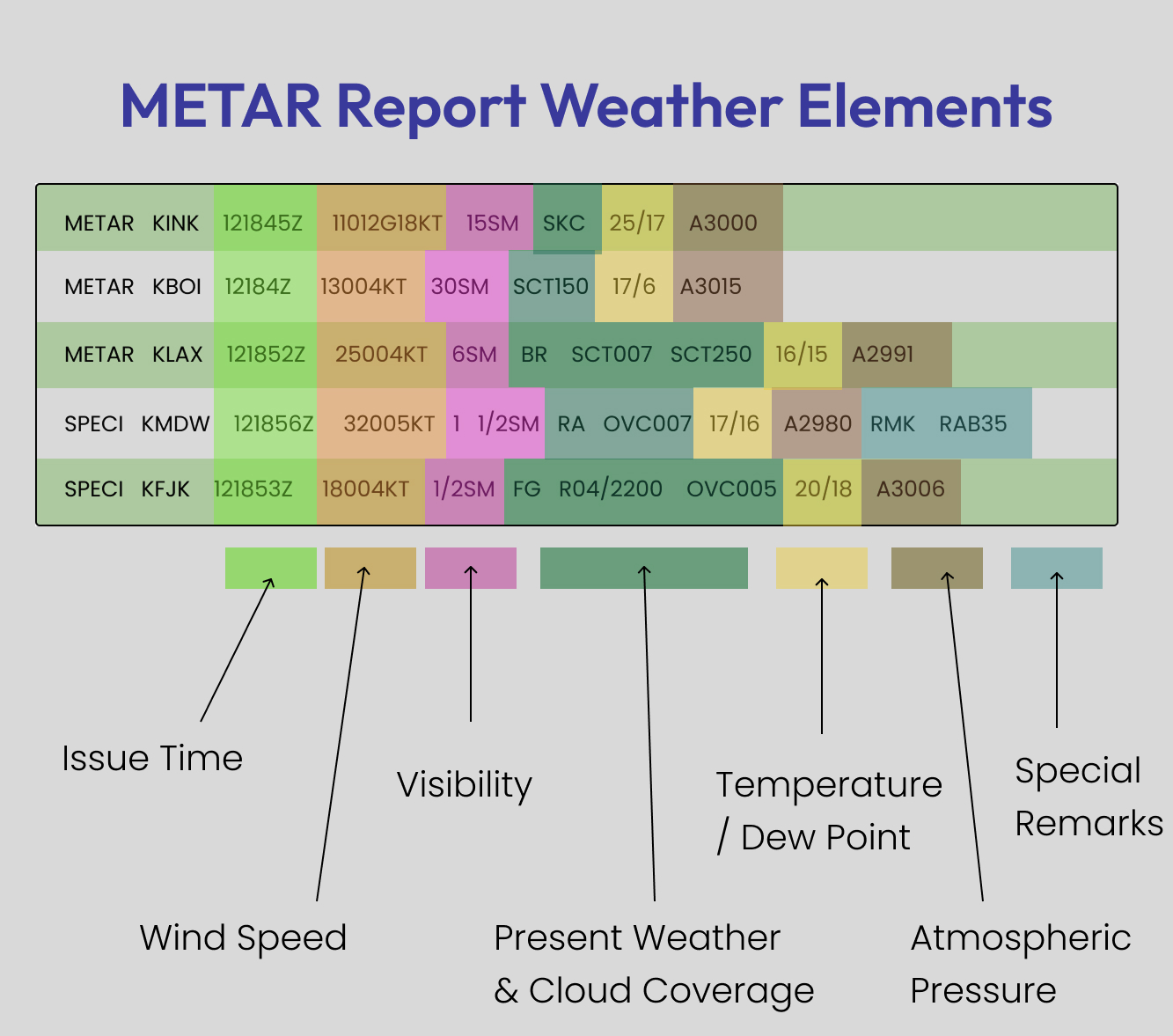
METAR Report Example
Let’s decipher the METAR report for KINK airport together, one section at a time.

1. Issue Time
At what hour was the METAR report issued?
121845Z
The report was issued on the 12th day of the month at 18:45 Zulu Time.
2. WIND Speed
What is the wind direction and speed at the surface?

11012G18KT
When checking on wind information using a METAR report you’ll see what direction the wind is blowing from, the wind speed in knots, and wind gust speed in knots.
– Note wind speed is reported in knots, not miles per hour.
The first three digits indicate the wind direction in degrees, and the following two digits represent the wind speed in knots. If there is a “G” followed by additional digits, this indicates gust speeds.
These 3 elements are broken up as follows on the report for KINK, in the order stated:
- 110 = Wind Direction
- 12 = Wind Speed in knots
- G18KT – Wind Gust Speed in knots

Another example would be, “25015G25” means winds from 250 degrees at 15 knots with gusts up to 25 knots.
Sustained Winds vs. Gusts
If no “G” (gust) value appears, the reported wind speed represents sustained winds only.
For example:
- 32010KT means wind is from 320° at a sustained speed of 10 knots.
- Because there is no “G” value, no gusting winds are being reported
When gusts are present, they are explicitly shown using a “G” followed by the gust speed. If you don’t see a “G”, you should expect steady, sustained winds at the listed speed, not gusting conditions.
3. Visibility
How far can I see horizontally at the time of this report?

15SM
Next we see the visibility, which is displayed in statute miles. Remember that FAA requires visibility to be at least 3 SM to fly legally and safely. Anything below that means you’re at risk.
In this example the visibility is 15 statute miles.

Other Notes:
At times, you may see a “P” before the visibility value in a METAR report.
The “P” stands for “greater than.”
This means the visibility is greater than the value shown, but the exact distance is not specified.
- For example: P6SM = Visibility is greater than 6 statute miles
This is commonly used when visibility is very good and exceeds the maximum value typically reported.
– Note: Visibility is always reported in Statute Miles (SM).
4. Cloud Coverage
What are the Current Cloud Conditions in the Sky?

SKC
In the METAR report for KINK, the sky condition is listed as SKC. SKC stands for Clear Skies. In other words, the sky is clear of cloud coverage.
Cloud Code Types:
There are several other cloud coverage codes you’ll commonly see in METAR reports. These codes describe how much of the sky is covered by clouds.
Some common examples include:
- SKC – Sky Clear – No clouds are present in the sky.
- FEW – Few clouds – Only a small amount of the sky is covered by clouds.
- SCT – Scattered clouds – Clouds cover a moderate portion of the sky, with plenty of open sky still visible.
- BKN – Broken clouds – Sky is significantly covered, but not fully overcast
- OVC – Overcast skies – The sky is completely covered by clouds, with little to no open sky visible.
Each of these tells you how much of the sky is covered, ranging from clear and sunny to completely overcast.
5. Temperature and Dew Point
What are the temperature and dew point, and how moist is the air?

25/17
25/17 indicates the temperature and dew point in degrees Celsius, which are listed after the cloud coverage information.
- Temperature: 25°C
- Dew Point: 17°C
– Note: Temperature is always reported in degrees Celsius, not Fahrenheit.
6. Altimeter
What is the current atmospheric pressure?

A3000
A3000 indicates that the altimeter setting (atmospheric pressure) at the station is 30.00 inches of mercury (inHg), with the ‘A’ signifying Altimeter and the following four digits representing the pressure value, common for aviation altimeters in the US.
How to decode A3000:
- A: Stands for Altimeter.
- 3000: Represents the pressure value of 30 inches

Practice Quiz
You’re forecasted to Ace this exam!
What’s Next?
In the following lessons, you’ll learn to interpret wind codes, visibility notation, weather phenomena abbreviations, and cloud coverage—step by step, on both METAR and TAF Reports.
By the end of this module, you’ll be able to look at any METAR or TAF report and know exactly what conditions to expect.