Airspaces on Sectional Charts
In this lesson you’re going to learn how all of the airspaces look on sectional charts based on their color and line type.
We’ll get into how to read the floor and ceiling height of each layer in the next lesson. For now, just get familiar with the concept of a 3D object that elevates into the sky, as it’s portrayed on a flat paper surface.
By the end of this lesson, when you look at a sectional chart, you’ll be able to spot each class of airspace just by recognizing what it looks like.
We’ll cover Class B, C, and D, which are anchored to airports, and Class E and G, which are not.
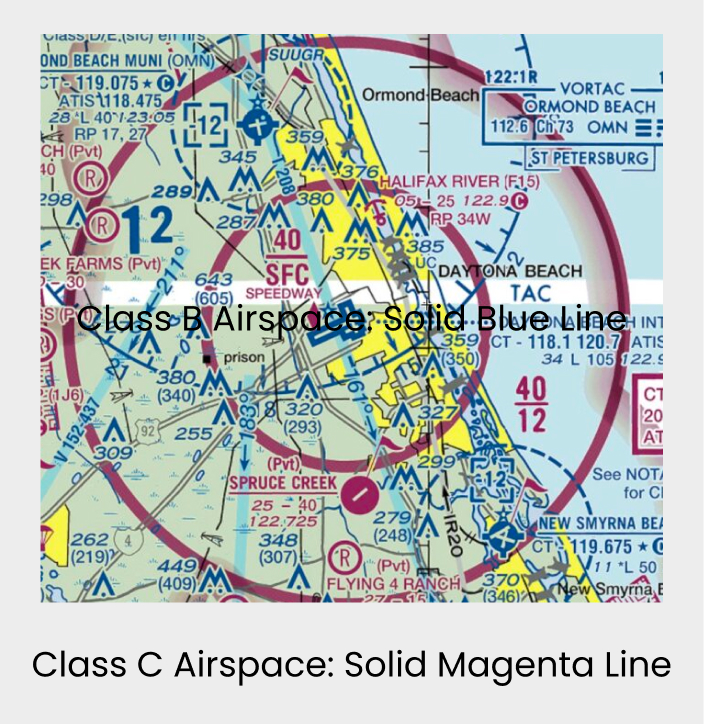
Some classes are clearly marked on the chart, like Class B with its solid blue lines or Class C with its solid magenta. Others aren’t drawn explicitly at all because they’re assumed. Class G, for example, isn’t labeled or outlined anywhere on the chart. You learn to recognize it by learning to recognize everything else around it.
Class B on Sectional Charts
Always Depicted with a Solid Blue Line
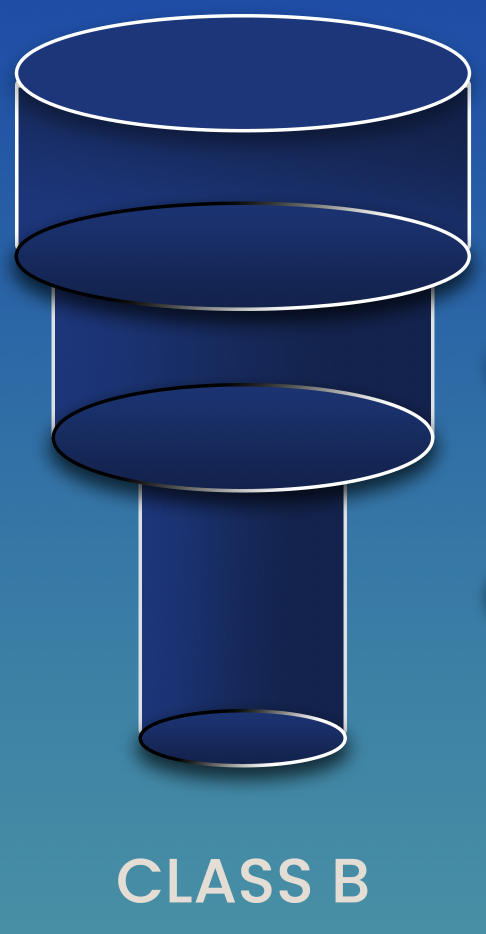
The 3D diagram shows you the shape: Class B airspace looks like an upside-down wedding cake. It’s widest at the top and gets narrower as it comes down toward the airport.
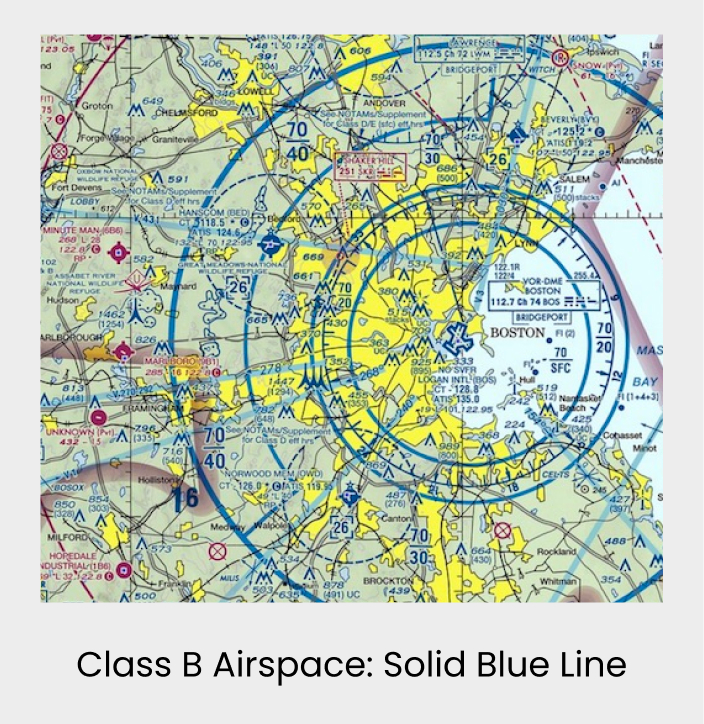
On the sectional chart, Class B is always shown in solid blue lines.
- You’ll always see three concentric rings (not always perfect circles, but roughly so) representing the center, the middle layer, and the outer third layer of that wedding cake shape. Those three rings are your visual anchor.
- When you see solid blue lines in 3 three rings, that’s Class B.
Class C on Sectional Charts
Always Depicted with a Solid Magina Line
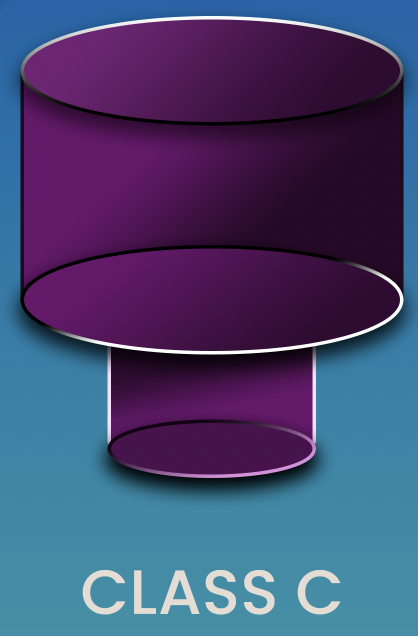
On the sectional chart, Class C is always shown in solid magenta lines. You’ll see two concentric rings, roughly circular, representing the inner and outer layer of that airspace.
When you see solid magenta, two rings — that’s Class C.

Introduction
When navigating airspace, understanding ceilings and surfaces is essential for making safe and informed decisions. This section breaks down how to interpret sectional charts to identify critical airspace details, including surface elevations, AGL/MSL fractions, and the bracketed numbers that represent upper limits.
You’ll see simplified examples to help you grasp the basics before progressing to more complex airspace scenarios. This knowledge isn’t just vital for real-world operations—it’s also something you’ll be tested on, so pay close attention!
Exam Prep
On the Part 107 exam, you’ll encounter images of sectional charts and be asked to identify all kinds of information
3 Key Elevation Elements on Sectional Charts
1. Surface Elevation of Airport Center
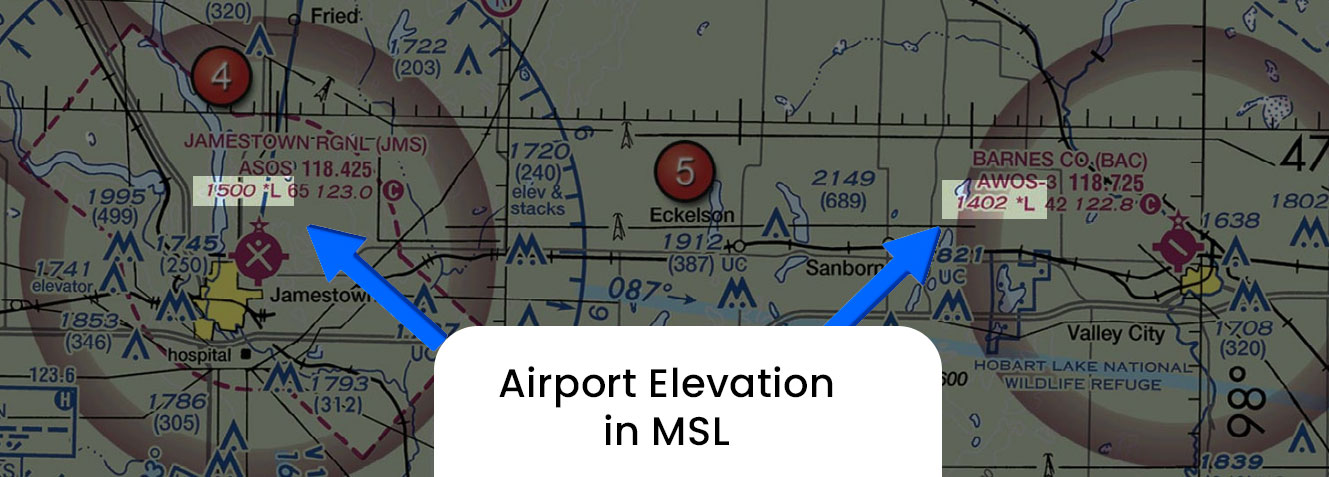
Where It Appears: Surface elevation is typically shown in the chart legend .It represents the height of the ground at a specific point.
Significance: Knowing the surface elevation helps you understand the height of the ground where you’re operating, which is integral for determining how high you can safely fly your drone. It’s also key to interpreting airspace boundaries and the minimum safe altitude (MSA).
For example, if the surface elevation in an area is 700 feet MSL, the ground level at that point is 700 feet above sea level. When you’re out flying the sUAS, your operations will often be based on AGL (Above Ground Level) measurements.
Surface and Ceiling of Sections within Airspace
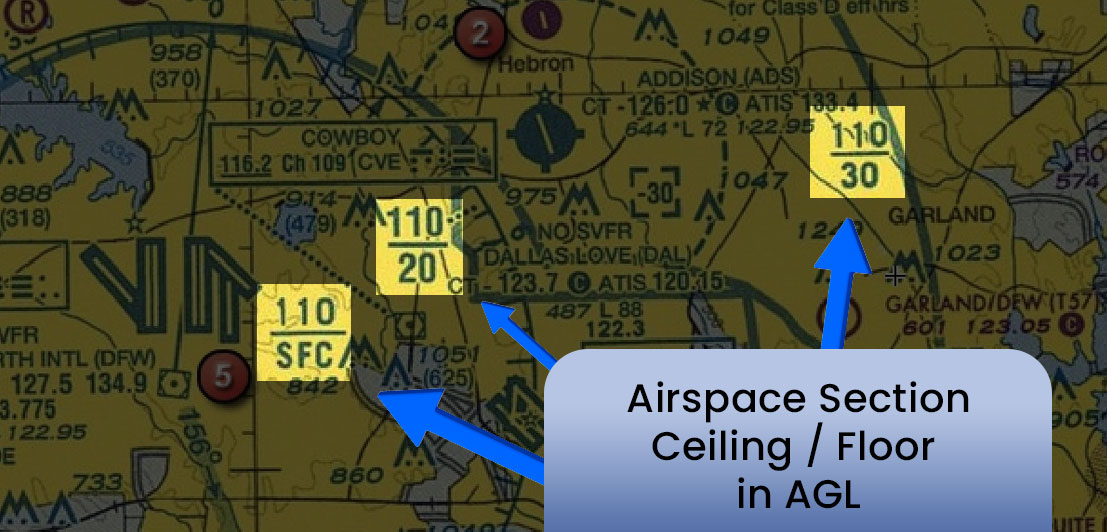
Here’s how to interpret the example 110/SFC, 110/20, and 110/30 regarding the Ceiling/Floor elevation in AGL on a sectional chart:
How the Numbers Are Written Shortened:
110: This represents 11,000 feet. The number is written without the comma, so you simply add a zero at the end to convert it to feet.
SFC: This stands for Surface, meaning the floor of the airspace is at ground level (0 feet AGL).
1. 110/SFC
This airspace starts at ground level (SFC) and extends up to 11,000 AGL.
- 110 refers to the ceiling of the airspace, which is 11,000 feet MSL.
- SFC stands for Surface, indicating that the floor of this airspace is at ground level (AGL), or 0 feet AGL..
2. 110/20
This airspace starts at 2,000 feet (AGL) and extends up to 11,000 feet (AGL).
3. 110/30
This airspace starts at 3,000 feet AGL and extends up to 11,000 feet AGL.

MSL Ceiling of an Airspace
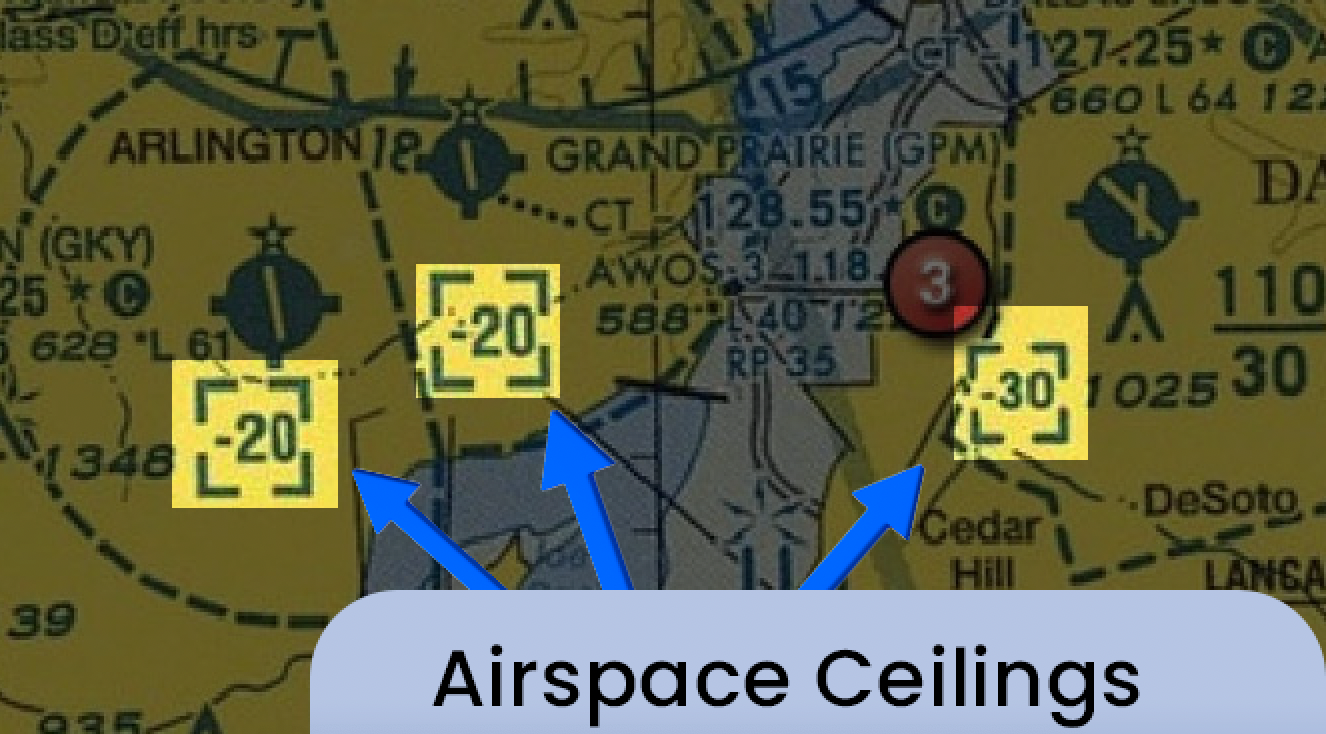
The numbers in brackets represent the ceiling of that particular airspace section. It is at this elevation point, that the airspace would cross over into its next layer or classification
These numbers indicate the maximum altitude you can fly within that specific airspace.
The bracketed number shows the upper boundary, meaning if the chart shows a bracketed number of [30], that airspace ceiling is 3000 feet MSL.
If it shows a bracketed number with a minus sign dash within it of [-30], that airspace ceiling is up to but not including 3000 feet MSL
Example: In Class B airspace, you might see a ceiling with a bracketed number of [25], meaning 2,500 ft MSL is the highest altitude you can fly within that portion of the airspace.
Example: Toledo Express (TOL) Class C Airspace
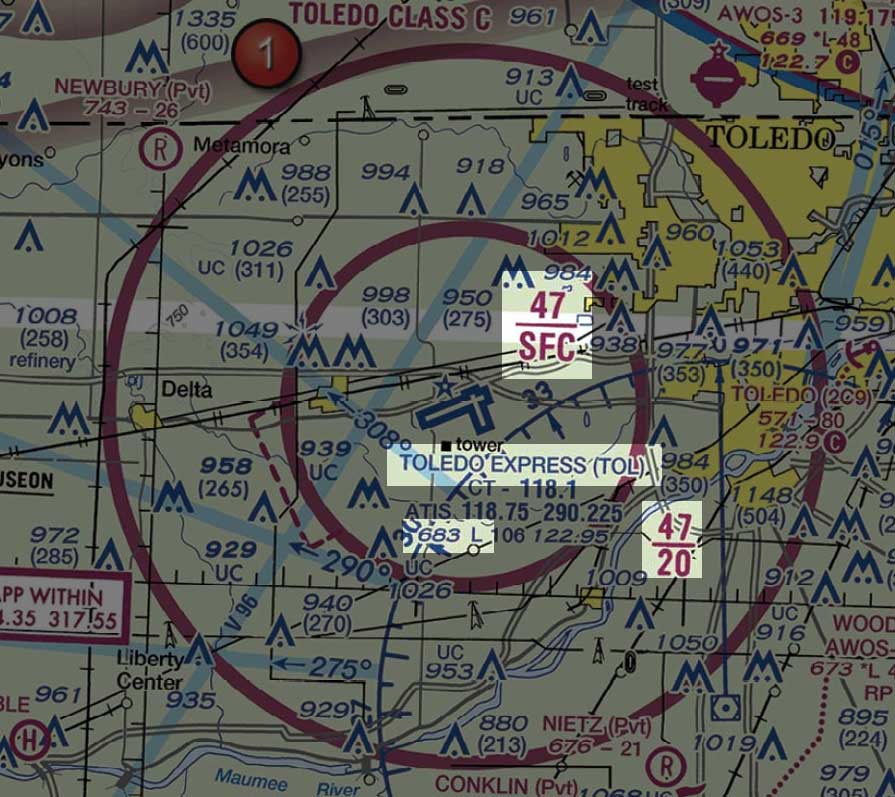
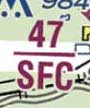
Defining 47/SFC, 47/20, and 683
683 in Airport Legend
This number represents the height of the ground at the airport above sea level.
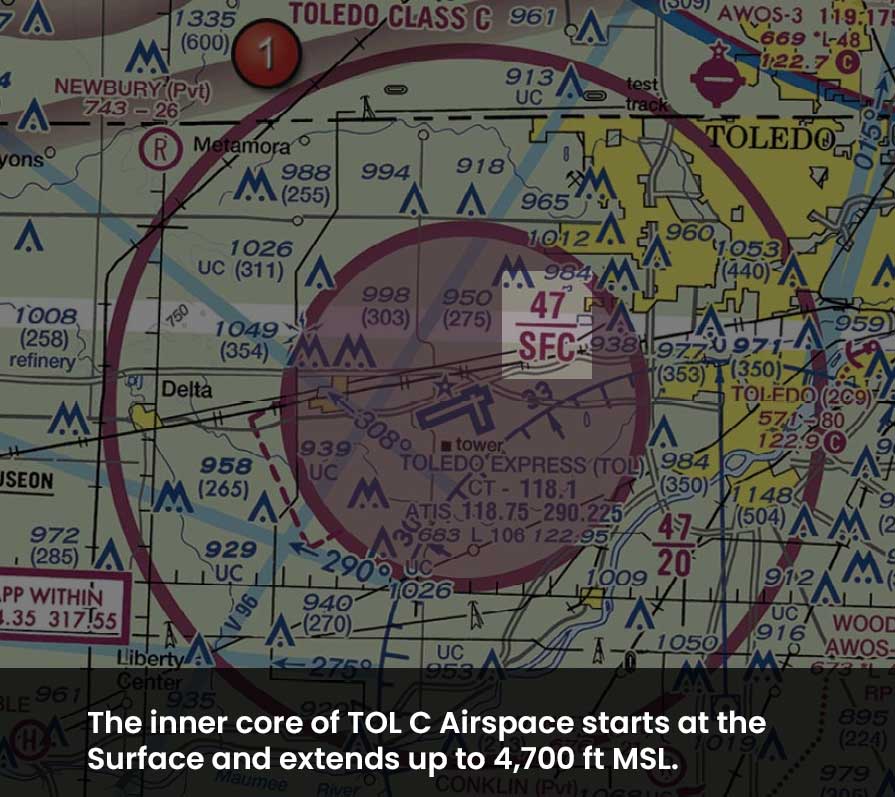
Inner Core 47/SFC:
- 47 refers to 4,700 feet MSL.
- SFC means the surface.
- This means the floor of the Class E airspace starts at the surface (0 feet AGL) and extends to 4,700 feet MSL.
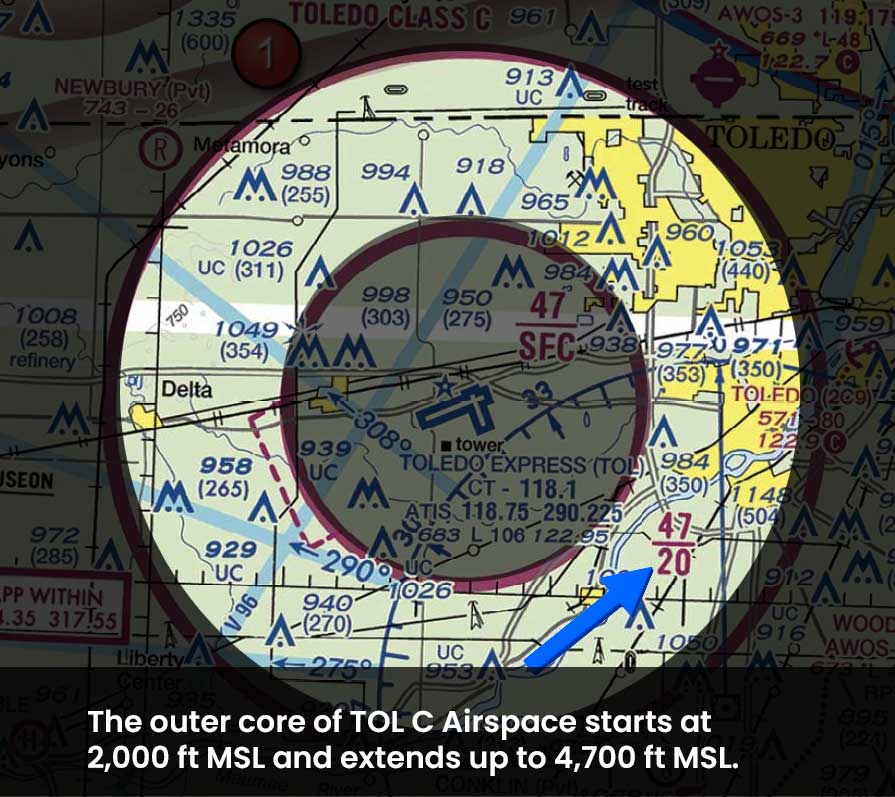
Outer Core 47/20:
- 47 again refers to 4,700 feet MSL.
- 20 refers to 2,000 feet AGL.
- This means the airspace extends from 2,000 feet AGL to 4,700 feet MSL.
Example: McKinney NTL (TKI) Class D Airspace & Surrounding B Airspace
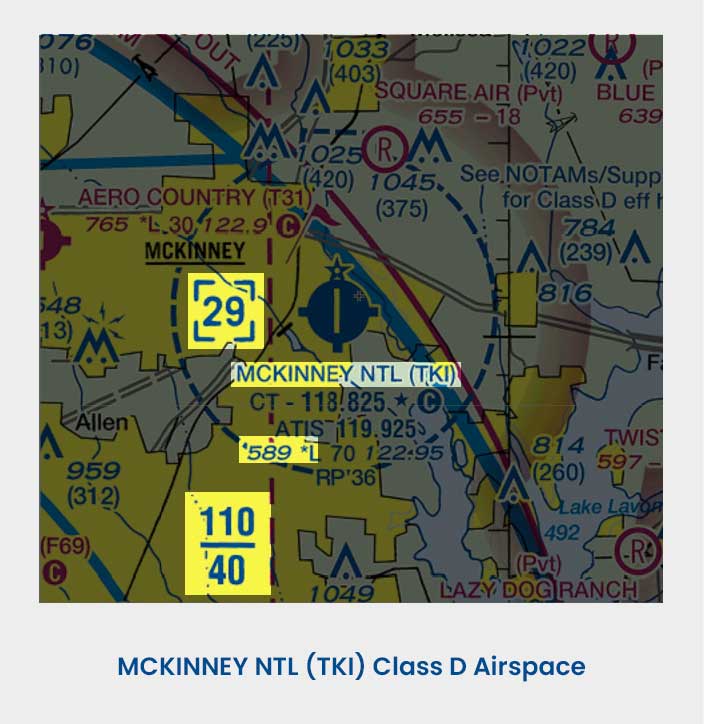
Defining [29], 589, and 110/40:
- [29] indicates the ceiling of the airspace is at 2,900 ft MSL
- 589 ft MSL is the height of the Airport itself.
- 110/40 tells us that the airspace class outside of McKinney Airport (which we know is Class B because of the solid blue lines) has a floor of 4,000 ft MSL and a ceiling of 11,000 ft MSL.
Determining AGL of Airspace Ceiling
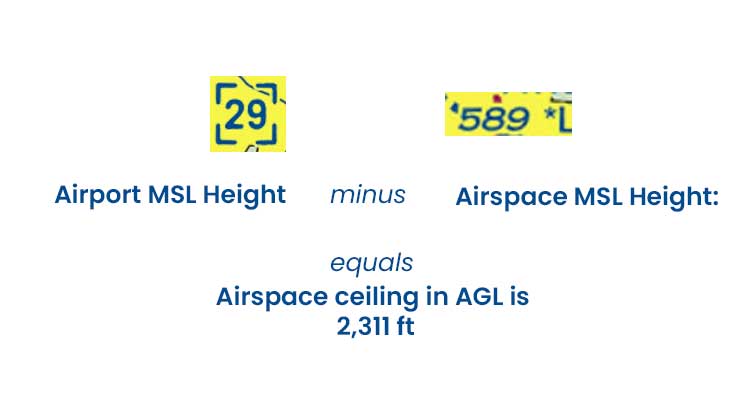
Imagine you want to determine how high above ground level the top of the Class D airspace of McKinny Airport extends.
Let’s walk through the simple subtraction equation we need to find that information out:
First, note the key height and elevation figures of TKI Airport.
- Airport Height: Airport sits at 589 ft MSL, according to the airport legend.
- Airspace Hight: Top of Class D airspace reaches and includes 2,900 MSL, marked in the blue-cornered box.
Second, to find the altitude in AG:
Airports MSL Elevation – Altitude of the Airspace MSL Ceiling
2,900 feet MSL – 589 feet MSL results in 2,311 feet AGL.
Therefore, we know that in terms of height from the surface, that TKI airport is 2,311 feet tall. So, a pilot would need to fly at least 2,311 feet AGL to remain clear of the Class D airspace.